> For the complete documentation index, see [llms.txt](https://emca.emudhra.com/llms.txt). Markdown versions of documentation pages are available by appending `.md` to page URLs; this page is available as [Markdown](https://emca.emudhra.com/previous-release-versions/v4.2.7/user-manual/officer/manage-keystores.md).
# Manage Keystores
The manage keystore feature in emCA allows you to check the status of connected HSMs when creating key profiles, view HSM device information, and see where the HSM is used while creating key profiles. This information can be helpful for troubleshooting HSM-related issues and for ensuring that you are using the correct HSM for your needs.
An officer can inspect the application's connections to various HSMs, as well as the details of the key pairs available in each HSM.
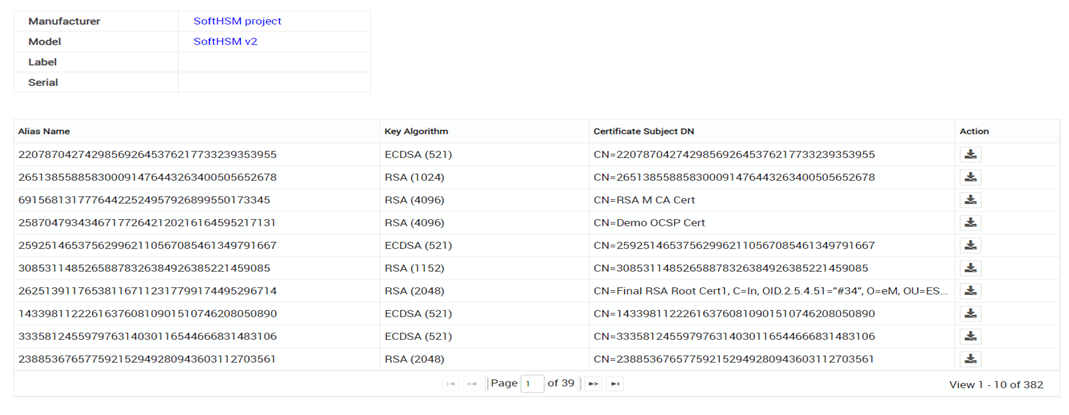
Click on to display the details for the corresponding HSM. The following view will open:
In order to facilitate the identification of the HSM, the top section displays basic information.
In the lower section, all keys located in the HSM Slot described by the corresponding PKCS11 configuration are listed.
If there are more keys that cannot fit on one page, use the navigation at the bottom of the table to switch pages.
{% hint style="info" %}
**Information:**
Unused keys can be identified by their Alias Name and CN being equal.
{% endhint %}
#### Download
Click on to download the certificate assigned to the key as
* DER-encoded X.509 certificate (.cer)
* Base64-encoded X.509 certificate (.cer)
* Cryptographic Message Syntax Standard PKCS#7 certificate (.p7b)
Select the desired export format and click "Download" to save the user certificate to your OS's default download location.
{% hint style="info" %}
**Information:**
Unused keys have expired certificates available for download.
The validity of these certificates is 0 seconds
{% endhint %}

 to display the details for the corresponding HSM. The following view will open:
 to download the certificate assigned to the key as
* DER-encoded X.509 certificate (.cer)
* Base64-encoded X.509 certificate (.cer)
* Cryptographic Message Syntax Standard PKCS#7 certificate (.p7b)
Select the desired export format and click "Download" to save the user certificate to your OS's default download location.
{% hint style="info" %}
**Information:**
Unused keys have expired certificates available for download.
The validity of these certificates is 0 seconds
{% endhint %}
to download the certificate assigned to the key as
* DER-encoded X.509 certificate (.cer)
* Base64-encoded X.509 certificate (.cer)
* Cryptographic Message Syntax Standard PKCS#7 certificate (.p7b)
Select the desired export format and click "Download" to save the user certificate to your OS's default download location.
{% hint style="info" %}
**Information:**
Unused keys have expired certificates available for download.
The validity of these certificates is 0 seconds
{% endhint %}