> For the complete documentation index, see [llms.txt](https://emca.emudhra.com/llms.txt). Markdown versions of documentation pages are available by appending `.md` to page URLs; this page is available as [Markdown](https://emca.emudhra.com/previous-release-versions/v4.2.7/user-manual/administrator/application-settings/external-applications.md).
# External Applications
External Applications are system or processes which must be registered in emCA in order to be permitted to the emCA API aka emCA Services.
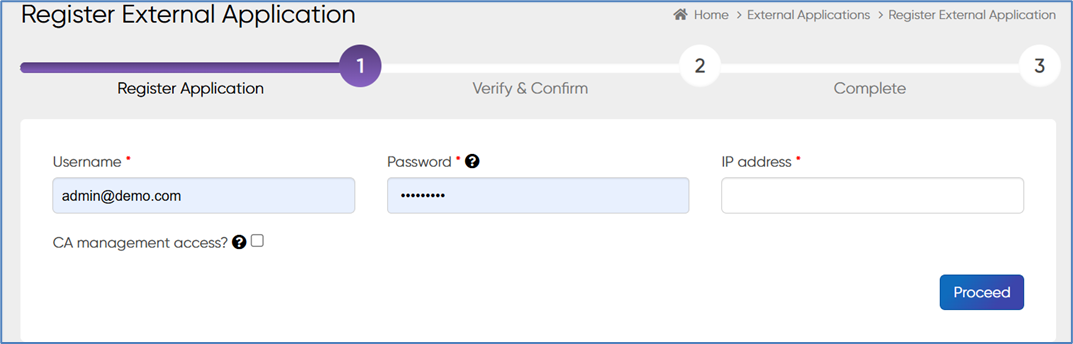
The onboarding process of External Applications can be triggered using the following UI:
Click + New to register a new External Application.
* Enter the Username for the new External Application.
* Enter a password for the new External Application. The password must comply with the password policy of emCA.
* Enter the IP Address of the new External Application. This address is used to whitelist the new External Application.
All of the above parameters will have to be provided during access to the emCA API.
After providing the required fields click on proceed to continue.
You will be prompted to authenticate the registration:
Authenticate using your Administrator token and proceed by pressing Authenticate.
Click Sign and Save to generate a certificate for the new External Application.
Click on "View all" to see the created application links and click on "New" to create a new certificate.