> For the complete documentation index, see [llms.txt](https://emca.emudhra.com/llms.txt). Markdown versions of documentation pages are available by appending `.md` to page URLs; this page is available as [Markdown](https://emca.emudhra.com/previous-release-versions/v4.2.6/user-manual/ca-administrator/dashboard-page.md).
# Dashboard Page
Upon successful login, if the minimum required users have not been created for a group, the following message will be displayed.
The Create User button will be available for the administrator to click and proceed with creating the required user(s) for the group.
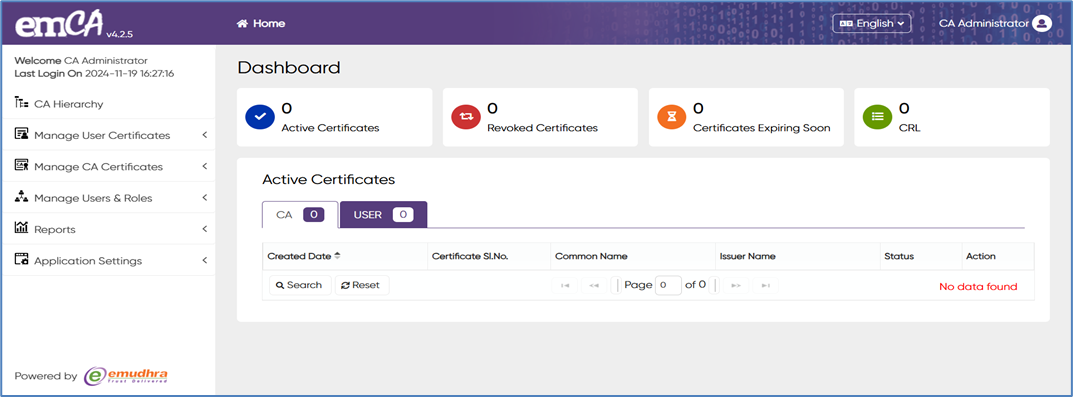
If the login is successful, the application will show them the main dashboard page, which looks like the example below section.
1. On the left-hand side of the dashboard page, there is a “Navigation panel” displaying various options that the CA Administrator can choose from.
2. Located at the top of every user interface (UI), there is a “Home” button. Clicking on this button will take you back to the emCA Dashboard, where you can access statistical information related to your Public Key Infrastructure (PKI).
3. On the top-right corner of each UI, you will find a “language” option. Here, users can select their preferred language from the drop-down menu, with choices between English and German.
4. Also situated on the top-right corner of each UI, you'll find the “User information” section. This menu contains two additional subsections: Profile and Logout.
* Profile: This section allows users to view their own user information. However, editing user information is not possible from this view.
* Logout: By selecting this option, users can manually log out from the emCA system.