> For the complete documentation index, see [llms.txt](https://emca.emudhra.com/llms.txt). Markdown versions of documentation pages are available by appending `.md` to page URLs; this page is available as [Markdown](https://emca.emudhra.com/previous-release-versions/v4.2.2/user-manual/auditor/reports.md).
# Reports
**The auditor provides detailed reports of application logs, showing all actions performed by users in a table format.**
**Application Logs**
All user actions are logged in a report table, with the latest appearing first.
The log events can be filtered by the following criteria:
Click "Search" to apply the filter of your choice. Click "Reset" to remove the filter again.
Click "Export to Excel" to export the entire Application Log to an XLSX file. The file will be downloaded to the standard download location of your OS.
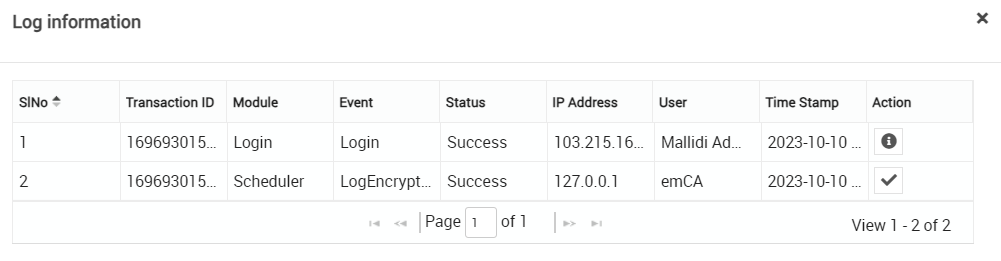
Click to view logs for a detailed report.
Click on the button to view the signed data. A pop-up window will appear displaying the signed data as shown below.
Click to trigger signature verification check on the application log entry.
If tempered, then it will give the failure message given below
If the data is correct, then give the success message given below:


 view logs for a detailed report.
 button to view the signed data. A pop-up window will appear displaying the signed data as shown below.

 trigger signature verification check on the application log entry.
If tempered, then it will give the failure message given below
trigger signature verification check on the application log entry.
If tempered, then it will give the failure message given below

