> For the complete documentation index, see [llms.txt](https://emca.emudhra.com/llms.txt). Markdown versions of documentation pages are available by appending `.md` to page URLs; this page is available as [Markdown](https://emca.emudhra.com/previous-release-versions/v4.0.13/user-manual/manage-user-certificate/manual-authorize-certificates.md).
# Manual Authorize Certificates
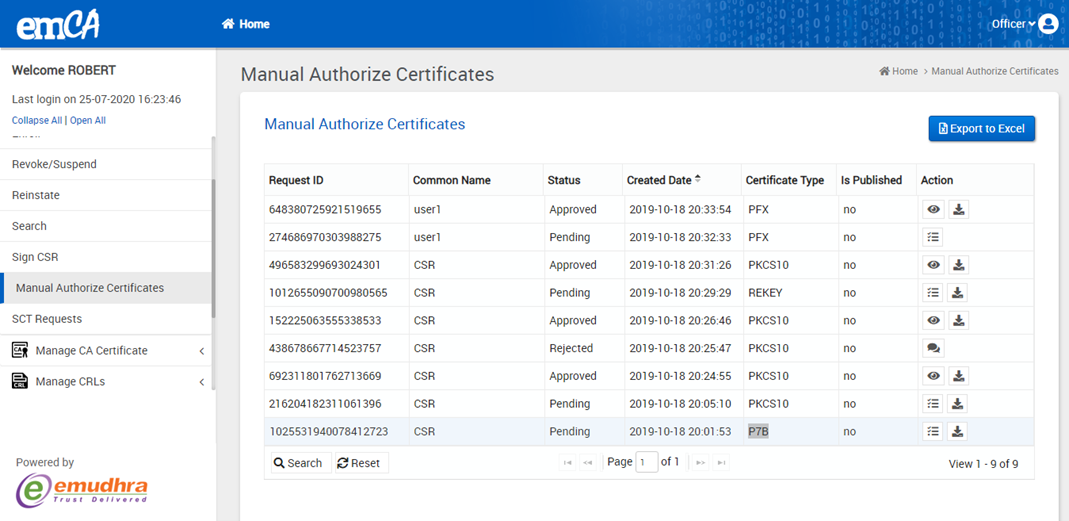
Manual Authorize Certificates under Manage User Certificate is accessible only to officers. If any certificate request created under Manual Authorization category (if user profile contains Is manual Authorization), Officer can review and perform the action (Approve/Reject).
There can be 4 type of request as:
a) PFX
b) PKCS10
c) REKEY
d) P7B
In the dashboard page, Click on Manage User Certificate -> Manual Authorize Certificates from sub menu, displays below.
Click on Approve/Reject icon it will display next page as shown below.
Click on Approve/Reject it will redirect to the next step i.e; step2.
Click on Confirm to get the success message.