> For the complete documentation index, see [llms.txt](https://emca.emudhra.com/llms.txt). Markdown versions of documentation pages are available by appending `.md` to page URLs; this page is available as [Markdown](https://emca.emudhra.com/previous-release-versions/v4.0.13/user-manual/manage-ca-certificate/manage-ca-certificates.md).
# Manage CA Certificates
The CA certificates are issued for a validity period of specified years. Only officers have the rights to manage generated CA certificates, import, and view and download the CA certificates.
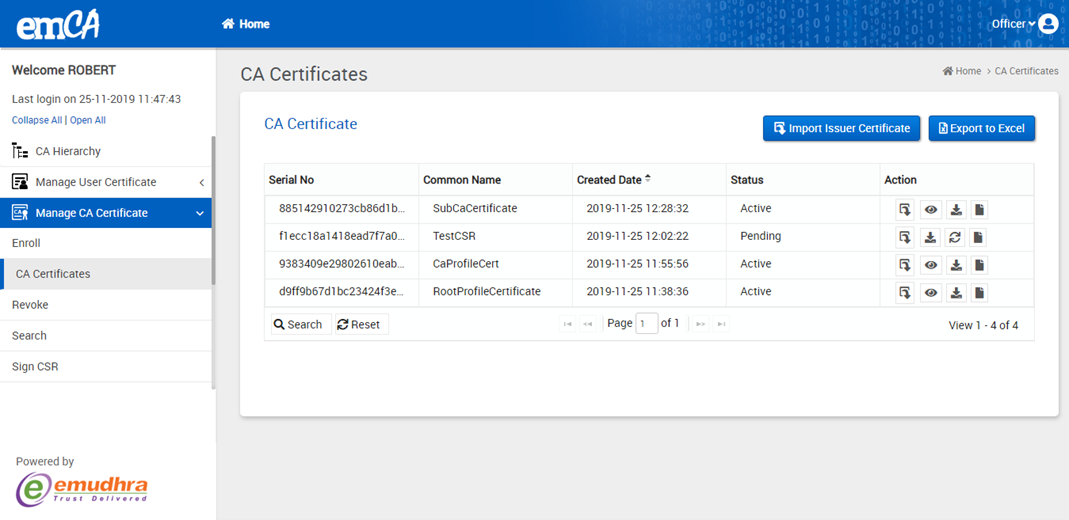
Click on CA Certificate Management->CA certificate from the sub menu as shown below figure.
Click on “Export to excel” will export CA certificate data
Certificates created through “CSR/Third party issuance”-> signing CSR will be in pending state with icon.
Click on View icon , certificate details will be displayed in pop up.
Click on icon to download CA certificate & CSR in required formats as shown in figure below
Click on the Download button to download the certificate and CSR.