# Deployment Build Files

## emCA

This section describes the procedure for configuring the environment variables required for emCA.

### Configuration

{% hint style="info" %}
**Note:** All actions required for setting up and configuring emCA should be done using administrator privileges.
{% endhint %}

### **Environment Variables**

**For emCA.properties**

In emCA application deployment, the configuration of properties file is done through environment variables. In this case, the user has to place the emCA.properties file on the server and make a note of the location of properties file. The same path needs to be provided during environment variables configuration. This file is used to configure database, logs and truststore.

Following is the procedure for configuring emCA.properties file in environment variables. The same Variable Name that is defined below has to be used during configuration.

Variable name: <mark style="color:yellow;">EMCA\_CONFIGURATION\_PATH</mark>

Variable value: <mark style="color:yellow;">location of property files (emCA.properties)</mark>

#### For Java

To deploy emCA war, java environment has to be set. Please follow the below procedure. If it is already configured, then please ignore this step.

To correctly set the JAVA\_HOME variable for all users, you should choose the first option, "Edit the system environment variables." Here's the corrected instruction:

Search for Environment Variables:

* Type "environment variables" in the Windows search bar.
* Click on "Edit the system environment variables".

System Properties Window:

* In the System Properties window that opens, click on the "Environment Variables" button.

<figure><img src="https://2804668976-files.gitbook.io/~/files/v0/b/gitbook-x-prod.appspot.com/o/spaces%2FOwstGDJbR4yGRTr2aEFp%2Fuploads%2FwHIdcrj2ebUCA4B96AZr%2Fimage.png?alt=media&#x26;token=61405691-390d-4617-92ef-c1934a2a03b8" alt=""><figcaption></figcaption></figure>

Edit System Variables:

* Under "System variables," find the JAVA\_HOME variable.
* If the variable exists:
* Select it and click "Edit."
* In the "Variable value" field, enter the full path to your JDK 21 installation directory (e.g., C \Program Files\Java\jdk-21.
* If the variable does not exist:
* Click "New."
* Enter JAVA\_HOME as the variable name.
* Enter the full path to your JDK 21 installation directory as the variable value.

&#x20;Save Changes:

* Click "OK" to save the changes in the Environment Variables window.
* Click "OK" to close the System Properties window.

<figure><img src="https://2804668976-files.gitbook.io/~/files/v0/b/gitbook-x-prod.appspot.com/o/spaces%2FOwstGDJbR4yGRTr2aEFp%2Fuploads%2FQdgGL7JESCwEj7w1GyGy%2Fimage.png?alt=media&#x26;token=32d95a81-a26b-4736-860e-5a48e1b688f1" alt=""><figcaption></figcaption></figure>

In emCA application deployment, the configuration of properties file is done through environment variables. In this case, the user has to place the emCA.properties file on the server and make a note of the location of properties file. The same path needs to be provided during environment variables configuration. This file is used to configure database, logs and truststore.

Following is the procedure for configuring emCA.properties file in environment variables. The same Variable Name which is defined below has to be used during configuration.

#### **For Windows**

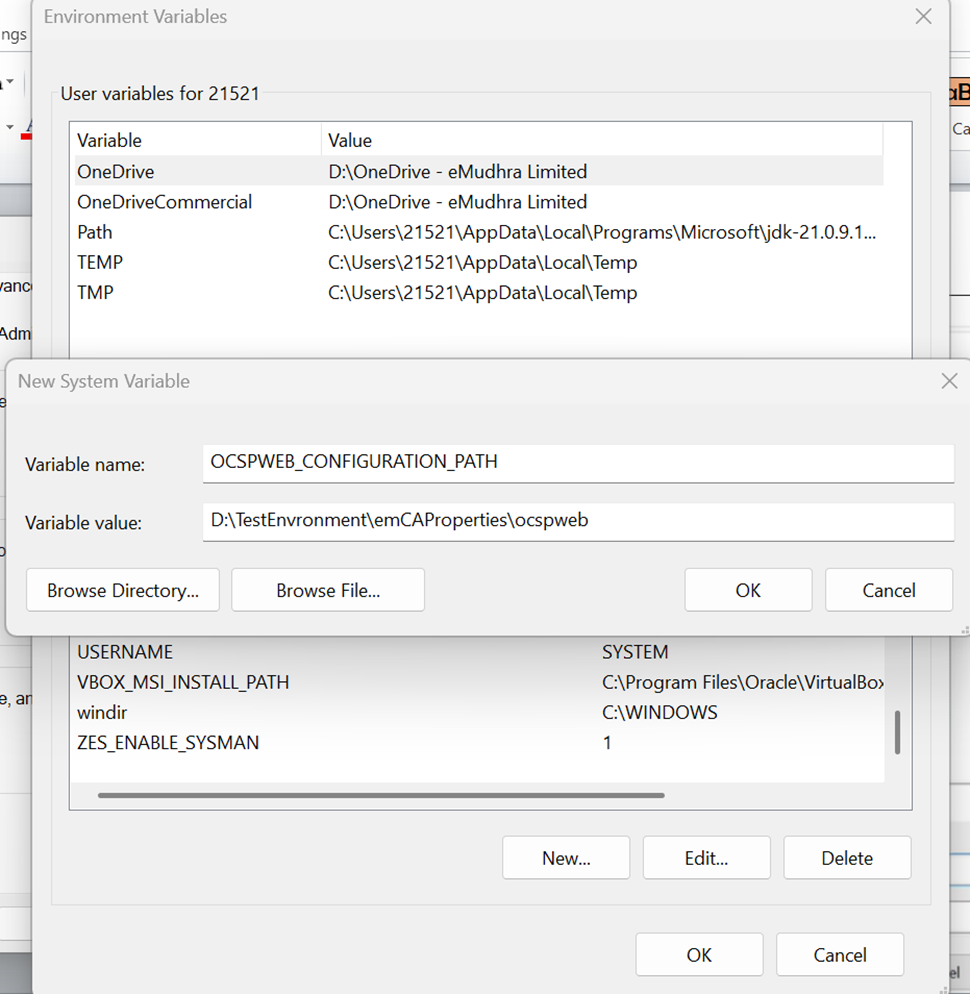
Go to Advanced System Settings -> Click on Environment Variables -> Click on New; then Enter the following as shown below figure

Variable name: <mark style="color:yellow;">EMCA\_CONFIGURATION\_PATH</mark>

Variable value: <mark style="color:yellow;">location of property files (emCA.properties)</mark>

<figure><img src="https://2804668976-files.gitbook.io/~/files/v0/b/gitbook-x-prod.appspot.com/o/spaces%2FOwstGDJbR4yGRTr2aEFp%2Fuploads%2F3LhqjVbmmgMXzJGFNAiC%2Fimage.png?alt=media&#x26;token=564031df-d9d8-4070-8783-dd6954ed6065" alt=""><figcaption></figcaption></figure>

It is recommended to restart the system after setting the environment variables

#### **For Linux**

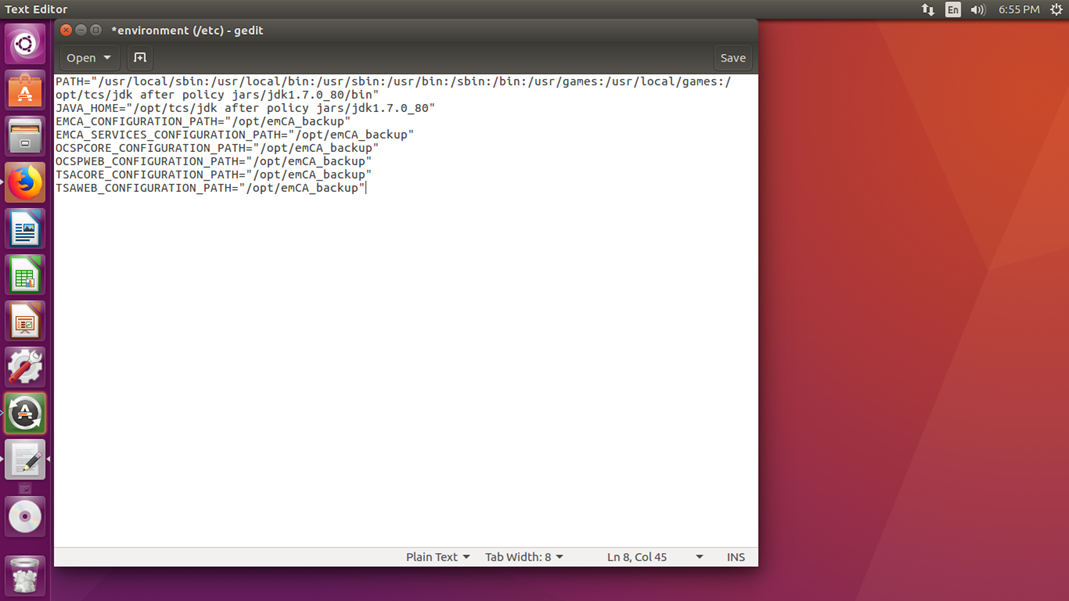
For setting environment variables in Linux run the following command

&#x20;             <mark style="color:yellow;">sudo -H gedit  /etc/environment</mark>

It will open the environment folder and set the emCA core path inside the folder.

<mark style="color:yellow;">EMCA \_CONFIGURATION\_PATH for emCA.properties file</mark>

<figure><img src="https://2804668976-files.gitbook.io/~/files/v0/b/gitbook-x-prod.appspot.com/o/spaces%2FOwstGDJbR4yGRTr2aEFp%2Fuploads%2FuBMmirclG57bmvjgQuOx%2Fimage.png?alt=media&#x26;token=c65b2b0f-ecea-4d42-92e6-bd588ec4bf1a" alt=""><figcaption></figcaption></figure>

Once the Environment variable is set for emCA.properties, the user can open the emCA.properties to configure various options which include configuring of database as well as logs.

It is recommended to restart the system after setting the environment variables.                                                                                                                                                                                                                                                                                                                                                                                                                                                                                                                                                                                                                                                                                                                                                                                                                                                                                                                                                                                                                                                                                                                                                                                                                                                                                                                                                                                                                                                                                                                                                                                                                                                                                                                                                                                                                                                                                                                                                                                                                                                                                                                                                                                                                                                                                                                                                                                                                                                                                                                                                                                                                                                                                                                                                                                                                                                                                                                                                                                                                                                                                                                                                                                                                                                                                                                                                                                                                                                                                                                                                                                                                                                                                                                                                                                                                                                                                                                                                                                                                                                                                                                                                                                                                                                                                                                                                                                                                                                                                                                                                                                                                                                                                                                                                                                                                                                                                                                                                                                                                                                                                                                                                                                                                                                                                                                                                                                                                                                                                                                                                                                                                                                                                                                                                                                                                                                                                                                                                                                                                                                                                                                                                                                                                                                                                                                                                                                                                                                                                                                                                                                                                                                                                                                                                                                                                                                                                                                                                                                                                                                                                                                                                                                                                                                                                                                                                                                                                                                                                                                                                                                                                                                                                                                                                                                                                                                                                                                                                                                                                                                                                                                                                                                                                                                                                                                                                                                                                                                                                                                                                                                                                                                                                                                                                                                                                                                                                                                                                                                                                                                                                                                                                                                                                                                                                                                                                                                                                                                                                                                                                                                                                                                                                                                                                                                                                                                                                                                                                                                                                                                                                                                                                                                                                                                                                                                                                                                                                                                                                                                                                                                                                                                                                                                                                                                                                                                                                                                                                                                                                                                                                                                                                                                                                                                                                                                                                                                                                                                                                                                                                                                                                                                                                                                                                                                                                                                                                                                                                                                                                                                                                                                                                                                                                                                                                                                                                                                                                                                                                                                                                                                                                                                                                                                                                                                                                                                                                                                                                                                                                                                                                                                                                                                                                                                                                                                                                                                                                                                                                                                                                                                                                                                                                                                                                                                                                                                                                                                                                                                                                                                                                                                                                                                                                                                                                                                                                                                                                                                                                                                                                                                                                                                                                                                                                                                                                                                                                                                                                                                                                                                                                                                                                                                                                                                                                                                                                                                                                                                                                                                                                                                                                                                                                                                                                                                                                                                                                                                                                                                                                                                                                                                                                                                                                                                                                                                                                                                                                                                                                                                                                                                                                                                                                                                                                                                                                                                                                                                                                                                                                                                                                                                                                                                                                                                                                                                                                                                                                                                                                                                                                                                                                                                                                                                                                                                                                                                                                                                                                                                                                                                                                                                                                                                                                                                                                                                                                                                                                                                                                                                                                                                                                                                                                                                                                                                                                                                                                                                                                                                                                                                                                                                                                                                                                                                                                                                                                                                                                                                                                                                                                                                                                                                                                                                                                                                                                                                                                                                                                                                                                                                                                                                                                                                                                                                                                                                                                                                                                                                                                                                                                                                                                                                                                                                                                                                                                                                                                                                                                                                                                                                                                                                                                                                                                                                                                                                                                                                                                                                                                                                                                                                                                                                                                                                                                                                                                                                                                                                                                                                                                                                                                                                                                                                                                                                                                                                                                                                                                                                                                                                                                                                                                                                                                                                                                                                                                                                                                                                                                                                                                                                                                                                                                                                                                                                                                                                                                                                                                                                                                                                                                                                                                                                                                                                                                                                                                                                                                                                                                                                                                                                                                                                                                                                                                                                                                                                                                                                                                                                                                                                                                                                                                                                                                                                                                                                                                                                                                                                                                                                                                                                                                                                                                                                                                                                                                                                                                                                                                                                                                                                                                                                                                                                                                                                                                                                                                                                                                                                                                                                                                                                                                                                                                                                                                                                                                                                                                                                                                                                                                                                                                                                                                                                                                                                                                                                                                                                                                                                                                                                                                                                                                                                                                                                                                                                                                                                                                                                                                                                                                                                                                                                                                                                                                                                                                                                                                                                                                                                                                                                                                                                                                                                                                                                                                                                                                                                                                                                                                                                                                                                                                                                                                                                                                                                                                                                                                                                                                                                                                                                                                                                                                                                                                                                                                                                                                                                                                                                                                                                                                                                                                                                                                                                                                                                                                                                                                                                                                                                                                                                                                                                                                                                                                                                                                                                                                                                                                                                                                                                                                                                                                                                                                                                                                                                                                                                                                                                                                                                                                                                                                                                                                                                                                                                                                                                                                                                                                                                                                                                                                                                                                                                                                                                                                                                                                                                                                                                                                                                                                                                                                                                                                                                                                                                                                                                                                                                                                                                                                                                                                                                                                                                                                                                                                                                                                                                                                                                                                                                                                                                                                                                                                                                                                                                                                                                                                                                                                                                                                                                                                                                                                                                                                                                                                                                                                                                                                                                                                                                                                                                                                                                                                                                                                                                                                                                                                                                                                                                                                                                                                                                                                                                                                                                                                                                                                                                                                                                                                                                                                                                                                                                                                                                                                                                                                                                                                                                                                                                                                                                                                                                                                                                                                                                                                                                                                                                                                                                                                                                                                                                                                                                                                                                                                                                                                                                                                                                                                                                                                                                                                                                                                                                                                                                                                                                                                                                                                                                                                                                                                                                                                                                                                                                                                                                                                                                                                                                                                                                                                                                                                                                                                                                                                                                                                                                                                                                                                                                                                                                                                                                                                                                                                                                                                                                                                                                                                                                                                                                                                                                                                                                                                                                                                                                                                                                                                                                                                                                                                                                                                                                                                                                                                                                                                                                                                                                                                                                                                                                                                                                                                                                                                                                                                                                                                                                                                                                                                                                                                                                                                                                                                                                                                                                                                                                                                                                                                                                                                                                                                                                                                                                                                                                                                                                                                                                                                                                                                                                                                                                                                                                                                                                                                                                                                                                                                                                                                                                                                                                                                                                                                                                                                                                                                                                                                                                                                                                                                                                                                                                                                                                                                                                                                                                                                                                                                                                                                                                                                                                                                                                                                                                                                                                                                                                                                                                                                                                                                                                                                                                                                                                                                                                                                                                                                                                                                                                                                                                                                                                                                                                                                                                                                                                                                                                                                                                                                                                                                                                                                                                                                                                                                                                                                                                                                                                                                                                                                                                                                                                                                                                                                                                                                                                                                                                                                                                                                                                                                                                                                                                                                                                                                                                                                                                                                                                                                                                                                                                                                                                                                                                                                                                                                                                                                                                                                                                                                                                                                                                                                                                                                                                                                                                                                                                                                                                                                                                                                                                                                                                                                                                                                                                                                                                                                                                                                                                                                                                                                                                                                                                                                                                                                                                                                                                                                                                                                                                                                                                                                                                                                                                                                                                                                                                                                                                                                                                                                                                                                                                                                                                                                                                                                                                                                                                                                                                                                                                                                                                                                                                                                                                                                                                                                                                                                                                                                                                                                                                                                                                                                                                                                                                                                                                                                                                                                                                                                                                                                                                                                                                                                                                                                                                                                                                                                                                                                                                                                                                                                                                                                                                                                                                                                                                                                                                                                                                                                                                                                                                                                                                                                                                                                                                                                                                                                                                                                                                                                                                                                                                                                                                                                                                                                                                                                                                                                                                                                                                                                                                                                                                                                                                                                                                                                                                                                                                                                                                                                                                                                                                                                                                                                                                                                                                                                                                                                                                                                                                                                                                                                                                                                                                                                                                                                                                                                                                                                                                                                                                                                                                                                                                                                                                                                                                                                                                                                                                                                                                                                                                                                                                                                                                                                                                                                                                                                                                                                                                                                                                                                                                                                                                                                                                                                                                                                                                                                                                                                                                                                                                                                                                                                                                                                                                                                                                                                                                                                                                                                                                                                                                                                                                                                                                                                                                                                                                                                                                                                                                                                                                                                                                                                                                                                                                                                                                                                                                                                                                                                                                                                                                                                                                                                                                                                                                                                                                                                                                                                                                                                                                                                                                                                                                                                                                                                                                                                                                                                                                                                                                                                                                                                                                                                                                                                                                                                                                                                                                                                                                                                                                                                                                                                                                                                                                                                                                                                                                                                                                                                                                                                                                                                                                                                                                                                                                                                                                                                                                                                                                                                                                                                                                                                                                                                                                                                                                                                                                                                                                                                                                                                                                                                                                                                                                                                                                                                                                                                                                                                                                                                                                                                                                                                                                                                                                                                                                                                                                                                                                                                                                                                                                                                                                                                                                                                                                                                                                                                                                                                                                                                                                                                                                                                                                                                                                                                                                                                                                                                                                                                                                                                                                                                                                                                                                                                                                                                                                                                                                                                                                                                                                                                                                                                                                                                                                                                                                                                                                                                                                                                                                                                                                                                                                                                                                                                                                                                                                                                                                                                                                                                                                                                                                                                                                                                                                                                                                                                                                                                                                                                                                                                                                                                                                                                                                                                                                                                                                                                                                                                                                                                                                                                                                                                                                                                                                                                                                                                                                                                                                                                                                                                                                                                                                                                                                                                                                                                                                                                                                                                                                                                                                                                                                                                                                                                                                                                                                                                                                                                                                                                                                                                                                                                                                                                                                                                                                                                                                                                                                                                                                                                                                                                                                                                                                                                                                                                                                                                                                                                                                                                                                                                                                                                                           &#x20;

### **Snapshot**

Please find below is the emCA.properties file snapshot along with description of properties:

```
#########################################################
##                 General Information                 ##
#########################################################
## Boolean values = "yes" or "no"                      ##
## String values  = base64 encoded                     ##
## Passwords      = encrypted with PasswordSecure.jar  ##
## Time intervals = in days if not specified otherwise ##
## Paths          = always absolute paths              ##
## Optionals      = set to empty if not needed         ##
## ENV Overrides  = Uppercase, dots -> underscores     ##
#########################################################

#######################################
##          MySQL Properties         ##
#######################################

# Hibernate Dialect
# ENV: DATASOURCE_HIBERNATE_DIALECT
datasource.hibernate.dialect=org.hibernate.dialect.MySQL8Dialect

# JDBC Configuration
# ENV: DATASOURCE_DRIVER_CLASS_NAME
datasource.driver.class.name=com.mysql.cj.jdbc.Driver

# ENV: EMCA_DATASOURCE_URL
emca.datasource.url=jdbc:mysql://localhost:3306/emca_prod

# ENV: EMCA_DATASOURCE_DEFAULT_TENANT_NAME
emca.datasource.default.tenant.name=emca_prod

# ENV: EMCA_DATASOURCE_APPLICATION_USERNAME
emca.datasource.application.username=emca_app

# ENV: EMCA_DATASOURCE_APPLICATION_PASSWORD
emca.datasource.application.password=EncryptedPasswordFor_emca_app

# ENV: DATASOURCE_HOST
datasource.host=localhost

# ENV: DATASOURCE_PORT
datasource.port=3306

# ENV: EMCA_DATASOURCE_ROLE_ACCESS_ENABLED
emca.datasource.role.access.enabled=true


########################################
##     Role-Based DB Credentials      ##
########################################

# CA Administrator
# ENV: EMCA_DATASOURCE_ROLE_CAADMINISTRATOR_USERNAME
emca.datasource.role.caadministrator.username=ca_admin

# ENV: EMCA_DATASOURCE_ROLE_CAADMINISTRATOR_PASSWORD
emca.datasource.role.caadministrator.password=EncryptedPasswordFor_ca_admin

# Administrator
# ENV: EMCA_DATASOURCE_ROLE_ADMINISTRATOR_USERNAME
emca.datasource.role.administrator.username=emca_admin

# ENV: EMCA_DATASOURCE_ROLE_ADMINISTRATOR_PASSWORD
emca.datasource.role.administrator.password=EncryptedPasswordFor_emca_admin

# Officer
# ENV: EMCA_DATASOURCE_ROLE_OFFICER_USERNAME
emca.datasource.role.officer.username=security_officer

# ENV: EMCA_DATASOURCE_ROLE_OFFICER_PASSWORD
emca.datasource.role.officer.password=EncryptedPasswordFor_emca_officer

# Auditor
# ENV: EMCA_DATASOURCE_ROLE_AUDITOR_USERNAME
emca.datasource.role.auditor.username=audit_user

# ENV: EMCA_DATASOURCE_ROLE_AUDITOR_PASSWORD
emca.datasource.role.auditor.password=EncryptedPasswordFor_emca_auditor


#############################################
##       Application Folder and Logging     ##
#############################################

# ENV: EMCA_APPLICATION_FOLDERS_LOCATION
emca.application.folders.location=/opt/emca/config

# ENV: EMCA_LOG4J_FILE_PATH
emca.log4j.file.path=/opt/emca/config/log4j.xml

#EMCA_ENVIRONMENT_IS_PRODUCTION
environment.isProduction = false

#######################################
##    PQC Service Configuration      ##
#######################################

# PQC Service URL (when running in Tomcat, use context path)
pqc.service.url=http://localhost:8080/emCA-PQC-Service/api/v1/pqc

# Enable/Disable PQC Service
# ENV: PQC_SERVICE_ENABLED
pqc.service.enabled=true

# PQC Service Timeout (milliseconds)
# ENV: PQC_SERVICE_TIMEOUT
pqc.service.timeout=30000


#######################################
##  Approval Workflow Configuration  ##
#######################################

# Enable/Disable Approval Workflow
# ENV: APPROVAL_WORKFLOW_ENABLED
# Note: Additional settings (minimum approvals, approver roles) are configured in EMCAUsersMetrix table
approval.workflow.enabled=true

```

{% hint style="info" %}
Use either a new database user or an existing one as the username in the above

The password for the database user must be encrypted using the PasswordSecure.jar tool. Please refer to Section 7. DB Password ENCRYPTOR
{% endhint %}

### **Database**

Open the *emCA.properties* file and based on the type of database used; the corresponding values need to be updated. Please find the below sample Database configuration provided for MySQL database.

&#x20;Example: for #MySQL database, use the below-mentioned values in the table:

<table data-header-hidden><thead><tr><th width="189.33333333333331"></th><th width="240"></th><th></th></tr></thead><tbody><tr><td><strong>Parameter</strong></td><td><strong>Description</strong></td><td><strong>Values to be Replaced</strong></td></tr><tr><td>datasource.hibernate.dialect</td><td>[DialectInfo] refers to Dialect information</td><td>org.hibernate.dialect.MySQLDialect</td></tr><tr><td>datasource.driver.class.name</td><td>[DriverClassName] refers to Driver class name</td><td>com.mysql.jdbc.Driver</td></tr><tr><td>emca.datasource.url</td><td>[URL] refers to Database URL</td><td>jdbc:mysql://127.0.0.1:3306/emca</td></tr><tr><td>emca.datasource.application.username</td><td>[UserName] refers to UserName who has access to this schema</td><td>root</td></tr><tr><td>emca.datasource<em>.application.password</em></td><td>[Password] refers to Password for the user</td><td>nNh0bStJeJxo3eu3taSY2Q==</td></tr></tbody></table>

### **Logs**

In the emCA.properties file also configure the logs path for capturing events. Provide the log file path to capture logs.

```
#Configure the log4j.xml path [This property is meant to configure local server path of log4j file]
logFilePath=C:/emCA/emCAPropertyFiles/log4j.xml
```

{% hint style="info" %}
**Note:** If java.util.logging.FileHandler is not configured then application logs will not be generated.
{% endhint %}

```
?xml version="1.0" encoding="UTF 8"? 
 Configuration status="WARN" monitorInterval="30">
 ! Logging Properties  
 <Properties>
 <Property name="LOG_PATTERN"> %d{yyyy-MM-dd HH:mm:ss.SSS	%pid 
 %p	%m%n</Property>
 <Property name="APP_LOG_ROOT" >E:\emCAv4\emCAProperties\logs\emca</Property>
</Properties>
 Appenders>
 ! Console Appender  
 Console name="Console" target="SYSTEM_OUT" follow="true">
 PatternLayout disableAnsi="false" pattern="$ CONSOLE_LOG_PATTERN " />
</Console>
 RollingFile name="warnLog" fileName="$ APP_LOG_ROOT /emCA-warn.log" filePattern="$ APP_LOG_ROOT /emCA-warn-%d{yyyy-MM-dd}_%i.log" immediateFlush="true" append="true">
LevelRangeFilter minLevel="WARN" maxLevel="WARN" onMatch="ACCEPT" onMismatch="DENY"/>
PatternLayout pattern="$ LOG_PATTERN "/>
Policies>
 OnStartupTriggeringPolicy />
 SizeBasedTriggeringPolicy size="10MB" />
</Policies>
 DefaultRolloverStrategy max="30000"/>
</RollingFile>
 RollingFile name="infoLog" fileName="$ APP_LOG_ROOT /emCA-info.log" filePattern="$ APP_LOG_ROOT /emCA-info-%d{yyyy-MM-dd}_%i.log" immediateFlush="true" append="true">
 LevelRangeFilter minLevel="INFO" maxLevel="INFO" onMatch="ACCEPT" onMismatch="DENY"/>
 PatternLayout pattern="$ LOG_PATTERN "/>
 Policies>
 OnStartupTriggeringPolicy />
 SizeBasedTriggeringPolicy size="10MB" />
</Policies>
 DefaultRolloverStrategy max="30000"/>
</RollingFile>
 RollingFile name="errorLog" fileName="$ APP_LOG_ROOT /emCA-error.log" filePattern="$ APP_LOG_ROOT /emCA-error-%d{yyyy-MM-dd}_%i.log" immediateFlush="true" append="true">
LevelRangeFilter minLevel="ERROR" maxLevel="ERROR" onMatch="ACCEPT" onMismatch="DENY"/>
 PatternLayout pattern="$ LOG_PATTERN "/>
 Policies>
 OnStartupTriggeringPolicy />
 SizeBasedTriggeringPolicy size="10MB" />
</Policies>
 DefaultRolloverStrategy max="30000"/>
</RollingFile>
 RollingFile name="debugLog" fileName="$ APP_LOG_ROOT /emCA-debug.log" filePattern="$ APP_LOG_ROOT /emCA-debug-%d{yyyy-MM-dd}_%i.log" immediateFlush="true" append="true">
 LevelRangeFilter minLevel="DEBUG" maxLevel="DEBUG" onMatch="ACCEPT" onMismatch="DENY"/>
 PatternLayout pattern="$ LOG_PATTERN "/>
 Policies>
 OnStartupTriggeringPolicy />
 SizeBasedTriggeringPolicy size="10MB" />
</Policies>
 DefaultRolloverStrategy max="30000"/>
</RollingFile>
</Appenders>
 Loggers>
 AsyncRoot level="debug" includeLocation="false">
 AppenderRef ref="infoLog" />
 AppenderRef ref="errorLog" />
 AppenderRef ref="warnLog" />
 AppenderRef ref="debugLog" />
 AppenderRef ref="Console" />
</AsyncRoot>
</Loggers>
</Configuration>

```

### **Deployment** <a href="#toc82804581" id="toc82804581"></a>

The following component is required for deployment:

&#x20;                     <mark style="color:green;">emCA application (emCA.war file)</mark>

emCA application package is provided as a war file which has to be deployed on the application server. Please configure and save all the properties in the file defined in section –‘For emCA.properties’ under Environment Variables

Please find the following steps to deploy the application:

* Copy the emCA.war inside Tomcat->Web apps folder *apache-tomcat-7.0.37\webapps.*
* Windows run services.msc.
* Select the service name Apache Tomcat and Click Start.

### Quick Check Guide <a href="#toc82804582" id="toc82804582"></a>

To verify if the application has been successfully deployed, please follow the below steps:

Once deployment is completed and server is started, open any browser like IE, Google Chrome, Firefox etc. and enter URL - <https://www.example.com/emCA/login.htm>

emCA login page should be displayed as shown below

<figure><img src="https://2804668976-files.gitbook.io/~/files/v0/b/gitbook-x-prod.appspot.com/o/spaces%2FOwstGDJbR4yGRTr2aEFp%2Fuploads%2FqVyc1XY4ZuzvABwmN0dh%2Fimage.png?alt=media&#x26;token=aa2a1ae7-72cc-4781-a337-380baf6db966" alt=""><figcaption></figcaption></figure>

After successful deployment of the emCA application, check if all the Tables have been created in the specified schema in the database.

Also, check for log file generation in the path mentioned (Configuration->Log Properties).

{% hint style="info" %}
Note: java.util.logging.FileHandler.pattern   = \<LogFolderPath>//emca\_debug.log

Please verify the specified highlight in the log4j.xml location and ensure that the logs folder has been successfully generated.
{% endhint %}

A log file should have been generated in the above-mentioned path.

## emCA API

This section provides the procedure for emCA API deployment and configuration. emCA API (emcaServices) provides an open API (Application Programming Interface) for integrating certificate services with third-party applications and devices. emCA API supports REST in JSON format. emCA APIs are light weight and flexible.

{% hint style="info" %}
Note:

The emCA API supports the following features:

&#x20;`/rest/certificates/request`,&#x20;

`/rest/certificates/request/keystore`,&#x20;

`/rest/certificates/export`,&#x20;

`/rest/certificates/revoke`,&#x20;

`/rest/certificates/suspend`,&#x20;

`/rest/certificates/reinstate`, and&#x20;

`/rest/certificates/request/regenerate`.
{% endhint %}

**Requirement**

* emcaServices.war package

**Deploy WAR**

* Copy emcaServices.war to \<APP\_SERVER>/webapps/
* Configure EMCA\_CONFIGURATION\_PATH
* Define datasource or JNDI for API database access

**Start Service**

* Restart application server
* Verify endpoint availability at https\://\<host>:\<port>/emCA/api/health

**Authentication & Transport**

* All endpoints require TLS
* Use token-based authentication in HTTP headers

**Supported REST Methods**

**CA Management:**

| GET  | <p> </p><p>getKeyProfiles</p><p> </p>            |
| ---- | ------------------------------------------------ |
| POST | <p> </p><p>createCA</p><p> </p>                  |
| POST | <p> </p><p>createCSR</p><p> </p>                 |
| POST | <p> </p><p>importCertificate</p><p> </p>         |
| POST | <p> </p><p>createOrUpdateCRLProfile</p><p> </p>  |
| POST | <p> </p><p>createOrUpdateCRL</p><p> </p>         |
| POST | <p> </p><p>getCRL</p><p> </p>                    |
| GET  | <p> </p><p>getCRL</p><p> </p>                    |
| POST | <p> </p><p>revoke/suspend</p><p> </p>            |
| POST | <p> </p><p>reinstateCA</p><p> </p>               |
| POST | <p> </p><p>createOrUpdateUserProfile</p><p> </p> |
| POST | <p> </p><p>createUserCertificate</p><p> </p>     |

**Certificate Management:**

| POST | getJwt-token            |
| ---- | ----------------------- |
| POST | createCertificate       |
| POST | createCertificates      |
| POST | createCustomCertificate |
| POST | createKeyStore          |
| POST | rekey                   |
| POST | regenerateKeyStore      |
| POST | revoke                  |
| POST | suspend                 |
| POST | reinstate               |
| POST | getCertificate          |
| POST | getProfiles             |
| POST | getProfileInfo          |
| POST | getCertInfo             |
| POST | getCertCount            |
| POST | getExpiringSoonCertInfo |
| POST | getCAs                  |
| POST | getCertificateChain     |
| GET  | getCAs                  |
| GET  | getCertificateChain     |
| GET  | getProfileInfo          |
| GET  | getProfiles             |
| GET  | getCertificate          |

### Configuration

{% hint style="info" %}
Note: All actions required for setting up and configuring emCA should be done using administrator privileges.
{% endhint %}

### **Environment Variables**

#### **Application.properties**

This file is used to configure database-related properties like dialect, driver class name, URL, Username, password (database user should have full privilege to the schema created for emCA application) as well as logs.

#### For Java

To deploy emCA war, java environment has to be set. Please follow the below procedure. If it is already configured, then please ignore this step.

To correctly set the JAVA\_HOME variable for all users, you should choose the first option, "Edit the system environment variables." Here's the corrected instruction:

Search for Environment Variables:

* Type "environment variables" in the Windows search bar.
* Click on "Edit the system environment variables".

System Properties Window:

* In the System Properties window that opens, click on the "Environment Variables" button.

<figure><img src="https://2804668976-files.gitbook.io/~/files/v0/b/gitbook-x-prod.appspot.com/o/spaces%2FOwstGDJbR4yGRTr2aEFp%2Fuploads%2FXFrZAQAup0qnPE0tU3nG%2Fimage.png?alt=media&#x26;token=4b70d662-bdf9-4d7e-95d1-0337021aa59a" alt=""><figcaption></figcaption></figure>

Edit System Variables:

* Under "System variables," find the JAVA\_HOME variable.
* If the variable exists:
* Select it and click "Edit."
* In the "Variable value" field, enter the full path to your JDK 21 installation directory (e.g., C \Program Files\Java\jdk-21 .
* If the variable does not exist:
* Click "New."
* Enter JAVA\_HOME as the variable name.
* Enter the full path to your JDK 21 installation directory as the variable value.

Save Changes:

* Click "OK" to save the changes in the Environment Variables window.
* Click "OK" to close the System Properties window.

<figure><img src="https://2804668976-files.gitbook.io/~/files/v0/b/gitbook-x-prod.appspot.com/o/spaces%2FOwstGDJbR4yGRTr2aEFp%2Fuploads%2F81bGFH4gcUTgj2kwQLmh%2Fimage.png?alt=media&#x26;token=1cbf6da9-cc14-4156-8f29-d7b0bb52fe9f" alt=""><figcaption></figcaption></figure>

The variable value should point out the physical path of the JDK 21. And click ok. For Application.properties

This file is used to configure database-related properties like dialect, driver class name, URL, Username, password (database user should have full privilege to the schema created for emCA application) as well as logs.

#### **For Windows**

Configure the property file path in environment variables as shown in below figure .

<figure><img src="https://2804668976-files.gitbook.io/~/files/v0/b/gitbook-x-prod.appspot.com/o/spaces%2FOwstGDJbR4yGRTr2aEFp%2Fuploads%2FhwubtOBucjalDFKqOC2z%2Fimage.png?alt=media&#x26;token=c1e4ce55-51d0-4ca3-8523-e88abdde3e41" alt=""><figcaption></figcaption></figure>

Variable name: <mark style="color:yellow;">EMCA\_SERVICES\_CONFIGURATION\_PATH</mark>

&#x20;Variable value: <mark style="color:yellow;">location of property files (application.properties)</mark>

#### **For Linux**

For setting environment variable in Linux, run following command.

<mark style="color:yellow;">sudo -H gedit  /etc/environment</mark>

It will open the environment folder and set the emCA and emCA Services path inside the folder.

EMCA\_SERVICES\_CONFIGURATION\_PATH for application.properties file as shown in the below figure.

<figure><img src="https://2804668976-files.gitbook.io/~/files/v0/b/gitbook-x-prod.appspot.com/o/spaces%2FOwstGDJbR4yGRTr2aEFp%2Fuploads%2Fm7TQBex9U4aZs6Ma9C3g%2Fimage.png?alt=media&#x26;token=7656f2bf-b886-4edd-90cf-6acf9fdb652a" alt=""><figcaption></figcaption></figure>

Once the Environment variable is set for application.properties, the user can open the application.properties to configure various options which includes configuring of database as well as logs.

### **Snapshot**

&#x20;Application.properties file snapshot for reference:

```
#########################################################
##                 General information                 ##
#########################################################
## Boolean values = "yes" or "no"                      ##
## String values  = base64 encoded                     ##
## Passwords      = encrypted with PasswordSecure.jar  ##
## Time intervals = in days if not specified otherwise ##
## Paths          = always absolute paths              ##
#########################################################

#######################################
##          MySQL Connection                            ##
#######################################

#API_JPA_PROPERTIES_HIBERNATE_DIALECT
datasource.hibernate.dialect=org.hibernate.dialect.MySQL8Dialect

#API_DATASOURCE_DRIVER_CLASS_NAME
datasource.driver.class.name=com.mysql.jdbc.Driver

#API_DATASOURCE_URL
api.datasource.url=jdbc:mysql://127.0.0.1:3306/emca_prod

# API_DATASOURCE_NAME
api.datasource.default.tenant.name=emca_prod

#API_DATASOURCE_USERNAME
api.datasource.username=root

# API_DATASOURCE_PASSWORD
api.datasource.password=Licm/hHGkujCreZ7KcZcRw==

#EMCA.APPLICATION.FOLDERS.LOCATION
emca.application.folders.location=D:/TestEnvronment/emCAProperties

#######################################
##       OAUTH2 Configuration                         ##
#######################################

#SECURITY.OAUTH.ENABLED
security.oauth2.enabled=false

#SECURITY.OAUTH2.RESOURCE_SERVER.URI
security.oauth2.resource.server.uri=http://<host>:<ip>
```

### **Database**

Open the *application.properties* file and based on the type of database used; the corresponding values need to be updated. Please find below a sample Database configuration provided for MySQL database.

&#x20;Example: for #MySQL database, use below mentioned values in the table:

\#Hibernate properties:

| ***Parameter***                       | **Description**                                               | **Values to be replaced**           |
| ------------------------------------- | ------------------------------------------------------------- | ----------------------------------- |
| *database.hibernate.dialect*          | \[DialectInfo] refers to Dialect information                  | org.hibernate.dialect.MySQL5Dialect |
| *spring.datasource.driver.class.name* | \[DriverClassName] refers to Driver class name                | com.mysql.jdbc.Driver               |
| *api.datasource.url*                  | \[URL] refers to Database URL                                 | jdbc:mysql://127.0.0.1:3306/emca    |
| *api.datasource.username*             | \[UserName] refers to UserName who has access to this schema  | Root                                |
| *api.datasource.password*             | \[Password] refers to Password for the user (Refer Section 6) | nNh0bStJeJxo3eu3taSY2Q==            |

&#x20;  Ex:

&#x20;\#MySQL

DialectInfo= “org.hibernate.dialect.MySQLDialect”

DriverClassName=” com.mysql.jdbc.Driver”

URL= “jdbc:mysql://<127.0.0.1:3306>/ emca”

UserName=”root”

Password=”root”

{% hint style="info" %}
**Note:** The same schema which is used for the emCA application should be used for the emCA API as well
{% endhint %}

### **Logs**

The application uses Log4j for logging. Please specify the local server path for collecting the logs in the log4j.xml file. The local server path of the log4j.xml file needs to be provided in the application.properties file which is set in the environment variables&#x20;

Log4J XML file as shown below:

```
?xml version="1.0" encoding="UTF 8"? 
 Configuration status="WARN" monitorInterval="30">
! Logging Properties  
 <Properties>
 <Property name="LOG_PATTERN">%d{yyyy-MM-dd HH:mm:ss.SSS	%pid 
 %p	%m%n</Property>
<Property
name="APP_LOG_ROOT">E:\emCAv4\emCAProperties\logs\api</Property>
</Properties>
 Appenders>
 ! Console Appender  
 Console name="Console" target="SYSTEM_OUT" follow="true">
 PatternLayout disableAnsi="false" pattern="$ CONSOLE_LOG_PATTERN " />
</Console>
 RollingFile name="debugLog" fileName="$ APP_LOG_ROOT /emCA_API debug.log" filePattern="$ APP_LOG_ROOT /emCA_API-debug-%d{yyyy-MM dd}_%i.log" immediateFlush="true" append="true">
 LevelRangeFilter minLevel="DEBUG" maxLevel="DEBUG" onMatch="ACCEPT" onMismatch="DENY"/>
PatternLayout pattern="$ LOG_PATTERN "/>
 Policies>
 OnStartupTriggeringPolicy />
 SizeBasedTriggeringPolicy size="10MB" />
</Policies>
DefaultRolloverStrategy max="30000"/>
</RollingFile>
 RollingFile name="warnLog" fileName="$ APP_LOG_ROOT /emCA_API-warn.log" filePattern="$ APP_LOG_ROOT /emCA_API-warn-%d{yyyy-MM-dd}_%i.log" immediateFlush="true" append="true">
 LevelRangeFilter minLevel="WARN" maxLevel="WARN" onMatch="ACCEPT" onMismatch="DENY"/>
 PatternLayout pattern="$ LOG_PATTERN "/>
 Policies>
 OnStartupTriggeringPolicy />
 SizeBasedTriggeringPolicy size="10MB" />
</Policies>
 DefaultRolloverStrategy max="30000"/>
</RollingFile>
 RollingFile name="infoLog" fileName="$ APP_LOG_ROOT /emCA_API-info.log" filePattern="$ APP_LOG_ROOT /emCA_API-info-%d{yyyy-MM-dd}_%i.log" immediateFlush="true" append="true">
 LevelRangeFilter minLevel="INFO" maxLevel="INFO" onMatch="ACCEPT" onMismatch="DENY"/>
 PatternLayout pattern="$ LOG_PATTERN "/>
 Policies>
 OnStartupTriggeringPolicy />
SizeBasedTriggeringPolicy size="10MB" />
</Policies>
 DefaultRolloverStrategy max="30000"/>
</RollingFile>
 RollingFile name="errorLog" fileName="$ APP_LOG_ROOT /emCA_API-error.log" filePattern="$ APP_LOG_ROOT /emCA_API-error-%d{yyyy-MM-dd}_%i.log" immediateFlush="true" append="true">
 LevelRangeFilter minLevel="ERROR" maxLevel="ERROR" onMatch="ACCEPT" onMismatch="DENY"/>
 PatternLayout pattern="$ LOG_PATTERN "/>
 Policies>
 OnStartupTriggeringPolicy />
 SizeBasedTriggeringPolicy size="10MB" />
</Policies>
 DefaultRolloverStrategy max="30000"/>
</RollingFile>
</Appenders>
 Loggers>
 AsyncRoot level="debug" includeLocation="false">
 AppenderRef ref="infoLog"/>
 AppenderRef ref="errorLog"/>
  AppenderRef ref="warnLog"/>
 AppenderRef ref="debugLog"/>
 AppenderRef ref="Console" />
</AsyncRoot>
</Loggers>
</Configuration>
```

In the above LOCAL SERVER PATH, the administrator has to provide folder path where in the log files get generated.

{% hint style="info" %}
Note: The highlight location differs between Windows and Linux systems. Please refer to the path specific to your environment. Additionally, the Log4j file will be included as part of the deployment package.
{% endhint %}

### Deployment <a href="#toc82804591" id="toc82804591"></a>

The following component is required for deployment:

&#x20;<mark style="color:green;">emCAServices.war</mark>

emCAServices comes as a war file that has to be deployed on the application server. Server provides configuration through the properties file.

Please configure and save all the properties defined in the properties file. Then deploy the configured emCAServices war file.

Please find below the steps to deploy the application:

* Copy the emcaServices war inside Tomcat ->Web apps folder apache-tomcat-7.0.37\webapps.
* Windows run services.msc.
* Select the service Apache Tomcat and click start.

### **Quick Check Guide** <a href="#toc82804592" id="toc82804592"></a>

Once deployment is completed and the server is started, Open any browser like Internet Explorer, Google Chrome, Firefox, etc. and enter the URL- https\:/[www.example.com/emcaServices](http://www.example.com/emcaServices)

Example: <https://www.example.com/emCAServices> in the enter address field&#x20;

The following message will be displayed as shown below.

<figure><img src="https://2804668976-files.gitbook.io/~/files/v0/b/gitbook-x-prod.appspot.com/o/spaces%2FOwstGDJbR4yGRTr2aEFp%2Fuploads%2FfroQGKESZucIAEGk9fCN%2Fimage.png?alt=media&#x26;token=964d2d98-58ab-49e6-9780-368abe7a436d" alt=""><figcaption></figcaption></figure>

## OCSP Core

This section provides the step-by-step guide for installation, configuration, and usage of OCSP Core. Online Certificate Status Protocol (OCSP) is an [Internet](https://en.wikipedia.org/wiki/Internet) [protocol](https://en.wikipedia.org/wiki/Communication_protocol) used for obtaining the revocation status of an [X.509](https://en.wikipedia.org/wiki/X.509) [digital certificate](https://en.wikipedia.org/wiki/Digital_certificate). An OCSP responder (a server typically run by the certificate issuer) may return a signed response signifying that the certificate specified in the request is 'good', 'revoked', or 'unknown'.

### Configuration <a href="#toc82804594" id="toc82804594"></a>

{% hint style="info" %}
Note: All actions required for setting up and configuring OCSP Core should be done using administrator privileges.
{% endhint %}

#### **Environment Variables**

#### **For ocspcore.properties**

This file is used to configure database related properties like dialect, driver class name, URL, Username, password (database user should have full privilege to the schema created for emCA application) as well as logs.

#### **For Linux**

For setting environment variable in Linux run following command

&#x20;        <mark style="color:yellow;background-color:yellow;">sudo -H gedit  /etc/environment</mark>

It will open environment folder and set OCSP Core path inside that

OCSPCORE\_CONFIGURATION\_PATH for ocspcore.properties file as shown in below figure

<figure><img src="https://2804668976-files.gitbook.io/~/files/v0/b/gitbook-x-prod.appspot.com/o/spaces%2FOwstGDJbR4yGRTr2aEFp%2Fuploads%2FSRY3KbVQ1mNvLv3z7LbP%2Fimage.png?alt=media&#x26;token=cf687829-396d-4622-b168-3865bc5c90d0" alt=""><figcaption></figcaption></figure>

Once the Environment variable is set for ocspcore.properties, the user can open the ocspcore.properties to configure various options which includes configuring of database as well as logs.

### **Snapshot**

Please find the below ocspcore.properties file snapshot for reference:

```
#EMOCSPRESPONDER_CONFIGURATION_PATH
#########################################################
##                 General information                 ##
#########################################################
## Boolean values = "yes" or "no"                      ##
## String values  = base64 encoded                     ##
## Passwords      = encrypted with PasswordSecure.jar  ##
## Time intervals = in days if not specified otherwise ##
## Paths          = always absolute paths              ##
## Optionals      = set to empty if not needed         ##
#########################################################

#######################################
##          MySQL Properties         ##
#######################################

# DATASOURCE_DRIVER_CLASS_NAME
datasource.driver.class.name=com.mysql.cj.jdbc.Driver

# HIBERNATE_DIALECT
datasource.hibernate.dialect=org.hibernate.dialect.MySQL8Dialect

# DATASOURCE_URL
ocspcore.datasource.url=jdbc:mysql://localhost:3306/<databaseName>

# DATASOURCE_USERNAME
ocspcore.datasource.username=[Username]

# DATASOURCE_PASSWORD
ocspcore.datasource.password=[Encryppt Password]

# DATASOURCE_DATABASE_NAME
ocspcore.default.database.name=[default databaseName]

#######################################
##      Encryption Keys path         ##
#######################################

# EMCA_AES_KEY_PATH
emca.aes.key.path=/home/emCA/emCAProperties/key/aes.key

# EMCA_DB_AES_KEY_PATH
# optional if subscriber encryption mode is database
emca.db.aes.key.path=/home/emCA/emCAProperties/key/subscriber-aes.key


#######################################
##       log4j Configuration         ##
#######################################

# LOG4J_FILE_PATH
ocspcore.log.file.path=/home/emCAv4Solution/emCAv4OCSP/OCSPProperties/ocspcore/log4j.xml
```

### **Database**

ocspcore.properties file is used to configure database related properties where we can configure database properties like dialect, driver class name, URL, Username, password (database user should have full privilege to the schema created for OCSP).

Open the ocspcore.properties file and change the below DB configuration:&#x20;

| <p> </p><p><strong>Parameter</strong></p><p> </p> | <p> </p><p><strong>Description</strong></p>                    |
| ------------------------------------------------- | -------------------------------------------------------------- |
| datasource.hibernate.dialect                      | \[DialectInfo] refers to Dialect information                   |
| datasource.driver.class.name                      | \[DriverClassName] refers to Driver class name                 |
| ocspcore.datasource.url                           | \[URL] refers to Database URL                                  |
| ocspcore.datasource.username                      | \[UserName] refers to UserName who has access to this schema   |
| ocspcore.datasource.password                      | \[Password] refers to Password for the user ( Refer Section 6) |

{% hint style="info" %}
**Note:** Default values in the configuration file will be used if it’s not changed as per the requirement. Please configure as per your requirement.

OCSP Responder will connect with the same schema which is connected to the emCA Application&#x20;
{% endhint %}

### **Logs**

The application uses Log4j for logging. Please specify the local server path for collecting the logs in the log4j.xml file. The local server path of log4j.xml file need to be provided in ocspcore.properties file which is set in the environment variables \[please refer section 6.3.1.1]

Log4J XML file as shown below:

```
<?xml version="1.0" encoding="UTF-8"?>
<Configuration status="WARN" monitorInterval="30">

    <!-- Logging Properties -->
    <Properties>
        <Property name="LOG_PATTERN">[%d{yyyy-MM-dd HH:mm:ss.SSS}] -- {%pid} [%p] - %m%n</Property>
        <Property name="APP_LOG_ROOT">E:/OCSP/logs/ocspcore</Property>
    </Properties>
    <Appenders>
        <!-- Console Appender -->
        <Console name="Console" target="SYSTEM_OUT" follow="true">
            <PatternLayout disableAnsi="false" pattern="${CONSOLE_LOG_PATTERN}" />
        </Console>				<RollingFile name="debugLog" fileName="${APP_LOG_ROOT}/OCSPResponderCore-debug.log" filePattern="${APP_LOG_ROOT}/OCSPResponderCore-debug-%d{yyyy-MM-dd}_%i.log" immediateFlush="true" append="true">
            <LevelRangeFilter minLevel="DEBUG" maxLevel="DEBUG" onMatch="ACCEPT" onMismatch="DENY"/>
            <PatternLayout pattern="${LOG_PATTERN}"/>
            <Policies>
                <OnStartupTriggeringPolicy />
                <SizeBasedTriggeringPolicy size="10MB" />
            </Policies>
            <DefaultRolloverStrategy max="30000"/>
        </RollingFile>
        <RollingFile name="warnLog" fileName="${APP_LOG_ROOT}/OCSPResponderCore-warn.log" filePattern="${APP_LOG_ROOT}/OCSPResponderCore-warn-%d{yyyy-MM-dd}_%i.log" immediateFlush="true" append="true">
            <LevelRangeFilter minLevel="WARN" maxLevel="WARN" onMatch="ACCEPT" onMismatch="DENY"/>
            <PatternLayout pattern="${LOG_PATTERN}"/>
            <Policies>
                <OnStartupTriggeringPolicy />
                <SizeBasedTriggeringPolicy size="10MB" />
            </Policies>
            <DefaultRolloverStrategy max="30000"/>
        </RollingFile>
        <RollingFile name="infoLog" fileName="${APP_LOG_ROOT}/OCSPResponderCore-info.log" filePattern="${APP_LOG_ROOT}/OCSPResponderCore-info-%d{yyyy-MM-dd}_%i.log" immediateFlush="true" append="true">
            <LevelRangeFilter minLevel="INFO" maxLevel="INFO" onMatch="ACCEPT" onMismatch="DENY"/>
            <PatternLayout pattern="${LOG_PATTERN}"/>
            <Policies>
                <OnStartupTriggeringPolicy />
                <SizeBasedTriggeringPolicy size="10MB" />
            </Policies>
            <DefaultRolloverStrategy max="30000"/>
        </RollingFile>
        <RollingFile name="errorLog" fileName="${APP_LOG_ROOT}/OCSPResponderCore-error.log" filePattern="${APP_LOG_ROOT}/OCSPResponderCore-error-%d{yyyy-MM-dd}_%i.log" immediateFlush="true" append="true">
            <LevelRangeFilter minLevel="ERROR" maxLevel="ERROR" onMatch="ACCEPT" onMismatch="DENY"/>
            <PatternLayout pattern="${LOG_PATTERN}"/>
            <Policies>
                <OnStartupTriggeringPolicy />
                <SizeBasedTriggeringPolicy size="10MB" />
            </Policies>
            <DefaultRolloverStrategy max="30000"/>
        </RollingFile>
    </Appenders>

    <Loggers>
        <AsyncRoot level="debug" includeLocation="false">
            <AppenderRef ref="infoLog"  />
            <AppenderRef ref="errorLog" />
            <AppenderRef ref="warnLog" />
			<AppenderRef ref="debugLog" />
           <AppenderRef ref="Console" />
        </AsyncRoot>
    </Loggers>

</Configuration>
```

In the above LOCAL SERVER PATH, the administrator has to provide a folder path where in the log files get generated.

### Deployment <a href="#toc82804601" id="toc82804601"></a>

The following component is required for deployment:

<mark style="color:green;">OCSP CORE(ocsprespondercore.war file)</mark>

OCSPCORE comes as a war file which has to be deployed on the application server. Server provides configuration through properties file.

Please configure and save all the properties defined in the properties file defined in section -‘(B) For ocspcore.properties’ under section 5.6.1.1. Environment Variables.

Then deploy the configured OCSP Core war file.

Please find below steps to deploy the application:

* Copy the ocsprespondercore.war inside Tomcat ->Web apps folder apache-tomcat\webapps
* Windows run services.msc
* Select Apache Tomcat and click Start

### Quick Check Guide <a href="#toc82804602" id="toc82804602"></a>

Once deployment is successfully done and the server is started, Open any browser like Internet Explorer, Google Chrome, Firefox etc. and enter URL-  as mentioned below

<https://www.example.com/ocsprespondercore> in enter address field place (For ex: https\:// 127.0.0.1:8080/ocsprespondercore)

The following message is displayed. This implies that the application is deployed properly.

<mark style="color:yellow;">“HTTP Status 405 - OCSP only supports POST”.</mark>

&#x20;To verify whether logs are getting generated as per the path defined, please open the folder that is mentioned in the configuration path set in log4j.xml file (Configuration->log4j.xml).

```
"[Local Server Path]/ocspresponder.log
```

Please make sure that the log file is created in the above-mentioned path.

## OCSP Responder Web

This section provides step by step guide for installation, configuration and usage of OCSP Web. This is generally deployed in the DMZ for external applications to interface. OCSP Web will in turn interfaces with OCSP Core that is deployed in the MZ where in only selected internal application will have access to it.

### Configuration <a href="#toc82804604" id="toc82804604"></a>

{% hint style="info" %}

<pre><code><strong>Note – all actions required for setting up and configuring OCSP Web should be done using administrator privileges
</strong></code></pre>

{% endhint %}

#### **Environment Variables - For ocspweb.properties**

This file is used to configure logs.

#### For Windows

Search for Environment Variables:

* Type "environment variables" in the Windows search bar.
* Click on "Edit the system environment variables".

System Properties Window:In the System Properties window that opens, click on the "Environment Variables" button.

Edit System Variables:

* Under "System variables," find the JAVA\_HOME variable.
* If the variable exists:
* Select it and click "Edit."
* In the "Variable value" field, enter the full path to your JDK 21 installation directory (e.g., C \Program Files\Java\jdk-21
* If the variable does not exist:
* Click "New."
* Enter JAVA\_HOME as the variable name.
* Enter the full path to your JDK 21 installation directory as the variable value.

Save Changes:

* Click "OK" to save the changes in the Environment Variables window.
* Click "OK" to close the System Properties window

<figure><img src="https://2804668976-files.gitbook.io/~/files/v0/b/gitbook-x-prod.appspot.com/o/spaces%2FOwstGDJbR4yGRTr2aEFp%2Fuploads%2FlNB90pYttzzjK51ObfKO%2Fimage.png?alt=media&#x26;token=c9996740-c257-41eb-bb0c-3426196a4694" alt=""><figcaption></figcaption></figure>

Environment Variables: OCSPWEB\_CONFIGURATION\_PATH=E:\OCSP\OCSPProperties\ocspweb

#### **For Linux**

For setting the environment variable in Linux, run following command:

&#x20;  <mark style="color:yellow;">sudo -H gedit  /etc/environment</mark>

It will open environment folder and set OCSP Web path inside that

OCSPWEB\_CONFIGURATION\_PATH  for ocspweb.properties file as shown in below figure

<figure><img src="https://2804668976-files.gitbook.io/~/files/v0/b/gitbook-x-prod.appspot.com/o/spaces%2FOwstGDJbR4yGRTr2aEFp%2Fuploads%2FOwZXXvB6OVjSEuxNoSxD%2Fimage.png?alt=media&#x26;token=a3840880-183b-4328-9bf1-c268db659073" alt=""><figcaption></figcaption></figure>

Once the Environment variable is set for ocspweb.properties, the user can open the ocspweb.properties to configure logs.

### **Snapshot**

Please find below is the ocspweb.properties file snapshot for reference:

```
#OCSPWEB_CONFIGURATION_PATH


# EMCA_OCSP_URL
emca.ocsp.url=http://127.0.0.1/OCSPResponderCore/ocsp

# EMCA_OCSP_REDIRECT_URL
# Redirect the url ocsp web if required
#emca.ocsp.redirect.url=https://google.com/

#######################################
##       log4j Configuration         ##
#######################################

# LOG4J_FILE_PATH
log4j.file.path=/home/emCAv4Solution/emCAv4OCSP/OCSPProperties/ocspweb/log4j.xml

#######################################
##      Spring Configuration         ##
#######################################

# SPRING_MVC_VIEW_PREFIX
spring.mvc.view.prefix=/WEB-INF/View/

# SPRING_MVC_VIEW_SUFFIX
spring.mvc.view.suffix=.jsp
```

### **Connection**

OCSP Web has to connect to OCSP Core for passing the requests received by OCSP Web to OCSP Core. For connecting to OCSP Core, in the properties file as shown below

```
# URL where ocspcore is deployed
emca.ocsp.url=http://<ipaddress>:<port>/OCSPResponderCore/ocsp
```

### **Logs**

The application uses Log4j for logging. Please specify the local server path for collecting the logs in the log4j.xml file. The local server path of log4j.xml file need to be provided in ocspweb.properties file which is set in the environment variables \[please refer section 6.4.1.1]

Log4J XML file as shown below:

```
<?xml version="1.0" encoding="UTF-8"?>
<Configuration status="WARN" monitorInterval="30">
    <!-- Logging Properties -->
    <Properties>
        <Property name="LOG_PATTERN">[%d{yyyy-MM-dd HH:mm:ss.SSS}] -- {%pid} [%p] - %m%n</Property>
        <Property name="APP_LOG_ROOT">E:/OCSP/logs/ocspweb</Property>
    </Properties>
    <Appenders>
        <!-- Console Appender -->
        <Console name="Console" target="SYSTEM_OUT" follow="true">
            <PatternLayout disableAnsi="false" pattern="${CONSOLE_LOG_PATTERN}" />
        </Console>
        <RollingFile name="debugLog" fileName="${APP_LOG_ROOT}/OCSPResponderWeb-debug.log" filePattern="${APP_LOG_ROOT}/OCSPResponderWeb-debug-%d{yyyy-MM-dd}_%i.log" immediateFlush="true" append="true">
            <LevelRangeFilter minLevel="DEBUG" maxLevel="DEBUG" onMatch="ACCEPT" onMismatch="DENY"/>
            <PatternLayout pattern="${LOG_PATTERN}"/>
            <Policies>
                <OnStartupTriggeringPolicy />
                <SizeBasedTriggeringPolicy size="10MB" />
            </Policies>
            <DefaultRolloverStrategy max="30000"/>
        </RollingFile>
        <RollingFile name="warnLog" fileName="${APP_LOG_ROOT}/OCSPResponderWeb-warn.log" filePattern="${APP_LOG_ROOT}/OCSPResponderWeb-warn-%d{yyyy-MM-dd}_%i.log" immediateFlush="true" append="true">
            <LevelRangeFilter minLevel="WARN" maxLevel="WARN" onMatch="ACCEPT" onMismatch="DENY"/>
            <PatternLayout pattern="${LOG_PATTERN}"/>
            <Policies>
                <OnStartupTriggeringPolicy />
                <SizeBasedTriggeringPolicy size="10MB" />
            </Policies>
            <DefaultRolloverStrategy max="30000"/>
        </RollingFile>
        <RollingFile name="infoLog" fileName="${APP_LOG_ROOT}/OCSPResponderWeb-info.log" filePattern="${APP_LOG_ROOT}/OCSPResponderWeb-info-%d{yyyy-MM-dd}_%i.log" immediateFlush="true" append="true">
            <LevelRangeFilter minLevel="INFO" maxLevel="INFO" onMatch="ACCEPT" onMismatch="DENY"/>
            <PatternLayout pattern="${LOG_PATTERN}"/>
            <Policies>
                <OnStartupTriggeringPolicy />
                <SizeBasedTriggeringPolicy size="10MB" />
            </Policies>
            <DefaultRolloverStrategy max="30000"/>
        </RollingFile>
        <RollingFile name="errorLog" fileName="${APP_LOG_ROOT}/OCSPResponderWeb-error.log" filePattern="${APP_LOG_ROOT}/OCSPResponderWeb-error-%d{yyyy-MM-dd}_%i.log" immediateFlush="true" append="true">
            <LevelRangeFilter minLevel="ERROR" maxLevel="ERROR" onMatch="ACCEPT" onMismatch="DENY"/>
            <PatternLayout pattern="${LOG_PATTERN}"/>
            <Policies>
                <OnStartupTriggeringPolicy />
                <SizeBasedTriggeringPolicy size="10MB" />
            </Policies>
            <DefaultRolloverStrategy max="30000"/>
        </RollingFile>
    </Appenders>

    <Loggers>
        <AsyncRoot level="debug" includeLocation="false">
            <AppenderRef ref="infoLog"  />
            <AppenderRef ref="errorLog" />
            <AppenderRef ref="warnLog" />
            <AppenderRef ref="debugLog" />
            <AppenderRef ref="Console" />
        </AsyncRoot>
    </Loggers>
</Configuration>
```

In the above LOCAL SERVER PATH, the administrator has to provide folder path where in the log files get generated.

### Deployment <a href="#toc82804611" id="toc82804611"></a>

The following components are required for deployment:

<mark style="color:green;">OCSP Web (ocspresponderweb.war file)</mark>

OCSP Web comes as a war file which has to be deployed on the application server. Server provides configuration through properties file.

Please configure and save all the properties. Then deploy the configured OCSP Web war file.

Please find below steps to deploy the application:

* Copy the ocspresponderweb.war inside Tomcat->Web apps folder apache-tomcat\webapps
* Windows run services.msc
* Go to Apache Tomcat and click Start

### Quick Check Guide <a href="#toc82804612" id="toc82804612"></a>

These endpoints are used when the OCSP service is running in single-tenant, or where no specific tenant identifier is required in the URL.&#x20;

OCSP Core (Default Tenant)

```
https://www.example.com/OCSPResponderWeb/ocsp
```

Use these endpoints when the OCSP service is operating in multi-tenant mode, where each group name is identified using a {tenantId} path variable.

OCSP Core (Multi-Tenant)

```
https://www.example.comOCSPResponderWeb/ocsp/{tenantId}
```

To verify whether logs are getting generated as per the path defined, please open the folder that is mentioned in the configuration path set in log4j.xml file (Configuration->log4j.xml)

```
 "[Local Server Path]/OCSPResponderWeb.log
```

Please make sure that the log file is created in the above-mentioned path.

## TSA Core

This section provides step by step guide for installation, configuration, and usage of TSA Core. TSA Core including (emTSA and eTSA)  is used for timestamping the requests received. And also help in managing timestamping Signers as well as keys.

### Configuration <a href="#toc82804614" id="toc82804614"></a>

{% hint style="info" %}
Note: All actions required for setting up and configuring TSA Core should be done using administrator privileges
{% endhint %}

### **Environment Variables**

**tsacore.properties**

This file is used to configure database related properties like dialect, driver class name, URL, Username, password (database user should have full privilege to the schema created for TSA application) as well as logs.

#### For Windows

Configure the property file path in environment variables as shown below in figure

<figure><img src="https://2804668976-files.gitbook.io/~/files/v0/b/gitbook-x-prod.appspot.com/o/spaces%2FOwstGDJbR4yGRTr2aEFp%2Fuploads%2FM58QmeuGL6lvVYq2imqN%2Fimage.png?alt=media&#x26;token=949d7822-08a7-476d-9ff4-22ffca72dc1f" alt=""><figcaption></figcaption></figure>

Variable name:TSACORE\_CONFIGURATION\_PATH=E:\TSA\TSAProperties\tsacore

#### **For Linux**

For setting the environment variable in Linux, run the following command.

&#x20;       <mark style="color:yellow;">sudo -H gedit  /etc/environment</mark>

It will open environment folder and set TSA Core path inside that

TSACORE\_CONFIGURATION\_PATH for tsacore.properties file as shown in below figure

<figure><img src="https://2804668976-files.gitbook.io/~/files/v0/b/gitbook-x-prod.appspot.com/o/spaces%2FOwstGDJbR4yGRTr2aEFp%2Fuploads%2FSiG05q3Df9DpX0iQEDBd%2Fimage.png?alt=media&#x26;token=2eada049-245d-4847-ae2d-a9a2afc9c61d" alt=""><figcaption></figcaption></figure>

Once the Environment variable is set for tsacore.properties, the user can open the tsacore.properties to configure various options which includes configuring of database as well as logs.

### **Snapshot**

Please find below is the tsacore.properties file snapshot for reference:

```
# Configure ENV on the server 
# ENV Variable : TSACORE_CONFIGURATION_PATH

# HIBERNATE_DIALECT
datasource.hibernate.dialect=org.hibernate.dialect.MySQL8Dialect
datasource.driver.class.name=com.mysql.jdbc.Driver
emtsa.datasource.url=jdbc:mysql://localhost:3306/emtsa
emtsa.datasource.username=root
emtsa.datasource.password=sTc6+9CC0MxOcqVgaJzbhg==

application.aes.key.path=D:/TestEnvronment/emCAProperties/key/aes.key

emtsa.pkcs12.type.key.profiles.path=D:/TestEnvronment/PKCS12
emtsa.pkcs11.type.key.profiles.path=D:/TestEnvronment/PKCS11

#For Logs
emtsa.log4j.file.path=D:/TestEnvronment/Logs/tsa/log4j.xml

#crlMapRefresh
time.enabled=24

# APPLICATION_AES_KEY_PATH
application.aes.key.path=[AES Key file path]

# PKCS12_TYPE_KEY_PROFILES_LOCATION
pkcs12.type.key.profiles.location=/home/emCAv4Solution/emCAv4TSA/TSAProperties/tsacore/pkcs12

# PKCS11_TYPE_KEY_PROFILES_LOCATION
pkcs11.type.key.profiles.location=/home/emCAv4Solution/emCAv4TSA/TSAProperties/tsacore/pkcs11
```

### **Database**

tsacore.properties file is used to configure database related properties where we can configure database properties like dialect, driver class name, URL, Username, password (database user should have full privilege to the schema created for TSA).

Open the tsacore.properties file and change the below DB configuration:&#x20;

| **Parameter**                | **Description**                                                |
| ---------------------------- | -------------------------------------------------------------- |
| datasource.hibernate.dialect | \[DialectInfo] refers to Dialect information                   |
| datasource.driver.class.name | \[DriverClassName] refers to Driver class name                 |
| emtsa.datasource.url         | \[URL] refers to Database URL                                  |
| emtsa.datasource.username    | \[UserName] refers to UserName who has access to this schema   |
| emtsa.datasource.password    | \[Password] refers to Password for the user ( Refer Section 6) |

### **esta Logs**

The application uses Log4j for logging. Please specify the local server path for collecting the logs in the log4j.xml file. The local server path of log4j.xml file need to be provided in tsacore.properties file which is set in the environment variables&#x20;

Log4J XML file as shown below:

```
<?xml version="1.0" encoding="UTF-8"?>
<Configuration status="WARN">
    <!-- Logging Properties -->
    <Properties>
        <Property name="LOG_PATTERN">[%d{yyyy-MM-dd HH:mm:ss.SSS}] -- {%pid} [%p] - %m%n</Property>
        <Property name="CONSOLE_LOG_PATTERN">%d{yyyy-MM-dd HH:mm:ss.SSS} %highlight{${LOG_LEVEL_PATTERN:-%5p}}{FATAL=red, ERROR=red, WARN=yellow, INFO=green, DEBUG=green, TRACE=green} %style{%pid}{magenta} --- [%4.15t] %style{%-20.40c{1.}}{cyan} : %m%n%ex</Property>
        <Property name="APP_LOG_ROOT">E:\TSA\TSAProperties\tsacore\logs\etsa</Property>
    </Properties>
    <Appenders>
        <!-- Console Appender $${date:yyyy-MM}/ -->
        <Console name="Console" target="SYSTEM_OUT" follow="true">
            <PatternLayout disableAnsi="false" pattern="${CONSOLE_LOG_PATTERN}" />
        </Console>
        <RollingFile name="warnLog" fileName="${APP_LOG_ROOT}/eTSA-warn.log" filePattern="${APP_LOG_ROOT}/eTSA-warn-%d{yyyy-MM-dd}_%i.log" immediateFlush="true" append="true">
            <LevelRangeFilter minLevel="WARN" maxLevel="WARN" onMatch="ACCEPT" onMismatch="DENY"/>
            <PatternLayout pattern="${LOG_PATTERN}"/>
            <Policies>
                <OnStartupTriggeringPolicy />
                <TimeBasedTriggeringPolicy />
                <SizeBasedTriggeringPolicy size="10MB" />
            </Policies>
            <DefaultRolloverStrategy max="30000"/>
        </RollingFile>
        <RollingFile name="infoLog" fileName="${APP_LOG_ROOT}/eTSA-info.log" filePattern="${APP_LOG_ROOT}/eTSA-info-%d{yyyy-MM-dd}_%i.log" immediateFlush="true" append="true">
            <LevelRangeFilter minLevel="INFO" maxLevel="INFO" onMatch="ACCEPT" onMismatch="DENY"/>
            <PatternLayout pattern="${LOG_PATTERN}"/>
            <Policies>
                <OnStartupTriggeringPolicy />
                <TimeBasedTriggeringPolicy />
                <SizeBasedTriggeringPolicy size="10MB" />
            </Policies>
            <DefaultRolloverStrategy max="30000"/>
        </RollingFile>
        
        <RollingFile name="debugLog" fileName="${APP_LOG_ROOT}/eTSA-debug.log" filePattern="${APP_LOG_ROOT}/eTSA-debug-%d{yyyy-MM-dd}_%i.log" immediateFlush="true" append="true">
            <LevelRangeFilter minLevel="DEBUG" maxLevel="DEBUG" onMatch="ACCEPT" onMismatch="DENY"/>
            <PatternLayout pattern="${LOG_PATTERN}"/>
            <Policies>
                <OnStartupTriggeringPolicy />
                <TimeBasedTriggeringPolicy />
                <SizeBasedTriggeringPolicy size="10MB" />
            </Policies>
            <DefaultRolloverStrategy max="30000"/>
        </RollingFile>
         
        <RollingFile name="errorLog" fileName="${APP_LOG_ROOT}/eTSA-error.log" filePattern="${APP_LOG_ROOT}/eTSA-error-%d{yyyy-MM-dd}_%i.log" immediateFlush="true" append="true">
            <LevelRangeFilter minLevel="ERROR" maxLevel="ERROR" onMatch="ACCEPT" onMismatch="DENY"/>
            <PatternLayout pattern="${LOG_PATTERN}"/>
            <Policies>
                <OnStartupTriggeringPolicy />
                <TimeBasedTriggeringPolicy />
                <SizeBasedTriggeringPolicy size="10MB" />
            </Policies>
            <DefaultRolloverStrategy max="30000"/>
        </RollingFile>
             
    </Appenders>
 
    <Loggers>
        <Root level="debug" includeLocation="false">
            <AppenderRef ref="infoLog"  />
            <AppenderRef ref="errorLog" />
            <AppenderRef ref="warnLog" />
            <AppenderRef ref="debugLog" />
           <AppenderRef ref="Console" /> 
        </Root>
    </Loggers>
 
</Configuration>
<RollingFile name="debugLog" fileName="${APP_LOG_ROOT}/eTSA-debug.log" filePattern="${APP_LOG_ROOT}/eTSA-debug-%d{yyyy-MM-dd}_%i.log" immediateFlush="true" append="true">
            <LevelRangeFilter minLevel="DEBUG" maxLevel="DEBUG" onMatch="ACCEPT" onMismatch="DENY"/>
            <PatternLayout pattern="${LOG_PATTERN}"/>
            <Policies>
                <OnStartupTriggeringPolicy />
                <SizeBasedTriggeringPolicy size="10MB" />
            </Policies>
            <DefaultRolloverStrategy max="30000"/>
        </RollingFile>
        
        <RollingFile name="warnLog" fileName="${APP_LOG_ROOT}/eTSA-warn.log" filePattern="${APP_LOG_ROOT}/eTSA-warn-%d{yyyy-MM-dd}_%i.log" immediateFlush="true" append="true">
            <LevelRangeFilter minLevel="WARN" maxLevel="WARN" onMatch="ACCEPT" onMismatch="DENY"/>
            <PatternLayout pattern="${LOG_PATTERN}"/>
            <Policies>
                <OnStartupTriggeringPolicy />
                <SizeBasedTriggeringPolicy size="10MB" />
            </Policies>
            <DefaultRolloverStrategy max="30000"/>
        </RollingFile>
        <RollingFile name="infoLog" fileName="${APP_LOG_ROOT}/eTSA-info.log" filePattern="${APP_LOG_ROOT}/eTSA-info-%d{yyyy-MM-dd}_%i.log" immediateFlush="true" append="true">
            <LevelRangeFilter minLevel="INFO" maxLevel="INFO" onMatch="ACCEPT" onMismatch="DENY"/>
            <PatternLayout pattern="${LOG_PATTERN}"/>
            <Policies>
                <OnStartupTriggeringPolicy />
                <SizeBasedTriggeringPolicy size="10MB" />
            </Policies>
            <DefaultRolloverStrategy max="30000"/>
        </RollingFile>
        <RollingFile name="errorLog" fileName="${APP_LOG_ROOT}/eTSA-error.log" filePattern="${APP_LOG_ROOT}/eTSA-error-%d{yyyy-MM-dd}_%i.log" immediateFlush="true" append="true">
            <LevelRangeFilter minLevel="ERROR" maxLevel="ERROR" onMatch="ACCEPT" onMismatch="DENY"/>
            <PatternLayout pattern="${LOG_PATTERN}"/>
            <Policies>
                <OnStartupTriggeringPolicy />
                <SizeBasedTriggeringPolicy size="10MB" />
            </Policies>
            <DefaultRolloverStrategy max="30000"/>
        </RollingFile>	    
    </Appenders>
    <Loggers>
        <AsyncRoot level="debug" includeLocation="false">
            <AppenderRef ref="infoLog" />
            <AppenderRef ref="errorLog" />
            <AppenderRef ref="warnLog" />
			<AppenderRef ref="debugLog" />
        </AsyncRoot>
    </Loggers>
</Configuration>

```

In the above  LOCAL SERVER PATH, the administrator has to provide folder path where in the log files get generated.

#### **emTSA Logs**

The application uses emTSA-Log4j for logging. Please specify the local server path for collecting the logs in the emTSA-log4j.xml file. The local server path of emTSA-log4j.xml file need to be provided in tsacore.properties file which is set in the environment variables.

Log4J XML file as shown below:

```
<?xml version="1.0" encoding="UTF-8"?>
<Configuration status="DEBUG" >
    <!-- Logging Properties -->
    <Properties>
        <Property name="LOG_PATTERN">[%d{yyyy-MM-dd HH:mm:ss.SSS}] -- {%pid} [%p] - %m%n</Property>
        <Property name="CONSOLE_LOG_PATTERN">%d{yyyy-MM-dd HH:mm:ss.SSS} %highlight{${LOG_LEVEL_PATTERN:-%5p}}{FATAL=red, ERROR=red, WARN=yellow, INFO=green, DEBUG=green, TRACE=green} %style{%pid}{magenta} --- [%4.15t] %style{%-20.40c{1.}}{cyan} : %m%n%ex</Property>
        <Property name="APP_LOG_ROOT">E:\TSA\TSAProperties\tsacore\logs\emtsa</Property>
    </Properties>
    <Appenders>
        <!-- Console Appender -->
        <Console name="Console" target="SYSTEM_OUT" follow="true">
            <PatternLayout disableAnsi="false" pattern="${CONSOLE_LOG_PATTERN}" />
        </Consol
        <!-- File Appenders on need basis -->
        <!-- <RollingFile name="frameworkLog" fileName="${APP_LOG_ROOT}/app-framework.log" filePattern="${APP_LOG_ROOT}/app-framework-%d{yyyy-MM-dd}-%i.log" immediateFlush="true" append="true">
            <LevelRangeFilter minLevel="ERROR" maxLevel="ERROR" onMatch="ACCEPT" onMismatch="DENY"/>
            <PatternLayout pattern="${LOG_PATTERN}"/>
            <Policies>
                <SizeBasedTriggeringPolicy size="1MB" />
            </Policies>
            <DefaultRolloverStrategy max="10"/>
        </RollingFil
        <RollingFile name="debugLog" fileName="${APP_LOG_ROOT}/TSA-debug.log" filePattern="${APP_LOG_ROOT}/app-debug-%d{yyyy-MM-dd}-%i.log" immediateFlush="true" append="true">
            <LevelRangeFilter minLevel="DEBUG" maxLevel="DEBUG" onMatch="ACCEPT" onMismatch="DENY"/>
            <PatternLayout pattern="${LOG_PATTERN}"/>
            <Policies>
                <OnStartupTriggeringPolicy />
                <SizeBasedTriggeringPolicy size="1MB" />
            </Policies>
            <DefaultRolloverStrategy max="10"/>
        </RollingFile>
        <RollingFile name="infoLog" fileName="${APP_LOG_ROOT}/TSA-info.log" filePattern="${APP_LOG_ROOT}/app-info-%d{yyyy-MM-dd}-%i.log" immediateFlush="true" append="true">
            <LevelRangeFilter minLevel="INFO" maxLevel="INFO" onMatch="ACCEPT" onMismatch="DENY"/>
            <PatternLayout pattern="${LOG_PATTERN}"/>
            <Policies>
                <OnStartupTriggeringPolicy />
                <SizeBasedTriggeringPolicy size="1MB" />
            </Policies>
            <DefaultRolloverStrategy max="10"/>
        </RollingFile>
        <RollingFile name="errorLog" fileName="${APP_LOG_ROOT}/TSA-error.log" filePattern="${APP_LOG_ROOT}/app-error-%d{yyyy-MM-dd}-%i.log" immediateFlush="true" append="true">
            <LevelRangeFilter minLevel="ERROR" maxLevel="ERROR" onMatch="ACCEPT" onMismatch="DENY"/>
            <PatternLayout pattern="${LOG_PATTERN}"/>
            <Policies>
                <OnStartupTriggeringPolicy />
                <SizeBasedTriggeringPolicy size="1MB" />
            </Policies>
            <DefaultRolloverStrategy max="10"/>
        </RollingFile>     
        <!-- <RollingFile name="perfLog" fileName="${APP_LOG_ROOT}/app-perf.log" filePattern="${APP_LOG_ROOT}/app-perf-%d{yyyy-MM-dd}-%i.log" immediateFlush="false" append="true" >
            <PatternLayout pattern="${LOG_PATTERN}"/>
            <Policies>
                <SizeBasedTriggeringPolicy size="1MB" />
            </Policies>
            <DefaultRolloverStrategy max="1"/>
        </RollingFile> -->
        <!-- <RollingFile name="traceLog" fileName="${APP_LOG_ROOT}/app-trace.log" filePattern="${APP_LOG_ROOT}/app-trace-%d{yyyy-MM-dd}-%i.log" immediateFlush="false" append="true">
            <PatternLayout pattern="${LOG_PATTERN}"/>
            <Policies>
                <SizeBasedTriggeringPolicy size="1MB" />
            </Policies>
            <DefaultRolloverStrategy max="1"/>
        </RollingFile> -->
    </Appenders>
     <Loggers>
        <Root level="debug" includeLocation="false">
            <AppenderRef ref="debugLog" />
            <AppenderRef ref="infoLog"  />
            <AppenderRef ref="errorLog" />
            <AppenderRef ref="Console" />
        </Root>
    </Loggers>
</Configuration>

```

In the above highlighted LOCAL SERVER PATH, the administrator has to provide folder path where in the log files get generated.

### Deployment <a href="#toc82804621" id="toc82804621"></a>

The following component is required for deployment:

<mark style="color:green;">TSA CORE(emTSA.war and eTSA.war file)</mark>

TSA CORE comes as 2 war files which has to be deployed on the application server. Server provides configuration through properties file.

Please configure and save all the properties defined in section - ‘(B) For tsacore.properties’ under section 5.8.1.1. Environment Variables. Then deploy the configured TSA Core war file.

Please find below steps to deploy the application:

* Copy the eTSA.war inside Tomcat ->Web apps folder apache-tomcat\webapps
* Windows run services.msc
* Go to Apache Tomcat and Click start

### Quick Check Guide <a href="#toc82804622" id="toc82804622"></a>

Once deployment is successfully done and the server is started, Open any browser like internet explorer, Google Chrome, Firefox etc. and enter URL-  as mentioned below

<https://www.example.com/eTSA> in enter address field place (For ex: https\:// 127.0.0.1:8080/eTSA)

The TSA Login page will be displayed.

To verify whether logs are getting generated as per the path defined, please open the folder that is mentioned in the configuration path set in log4j.xml file (Configuration->log4j.xml)

```
"[Local Server Path]/eTSA.log
```

Please make sure that the log file is created in the above-mentioned path.

## TSA Web

This section provides step by step guide for the installation, configuration, and usage of TSA Web. This is generally deployed in the DMZ for external applications to interface. TSA Web will in turn interface with TSA Core that is deployed in the Militarized Zone/ Trusted Zone where in only selected internal applications will have access to it.

### Configuration <a href="#toc82804624" id="toc82804624"></a>

{% hint style="info" %}
Note: All actions required for setting up and configuring TSA Web should be done using administrator privileges.
{% endhint %}

### **Environment Variables**&#x20;

**tsaweb.properties**

This file is used to configure connections with TSA Core as well as logs.

In order to deploy WebTSA.war, java environment has to be set. Please follow the below procedure. If this is already configured, then please ignore this section.

To correctly set the JAVA\_HOME variable for all users, you should choose the first option, "Edit the system environment variables." Here's the corrected instruction:

Search for Environment Variables:

* Type "environment variables" in the Windows search bar.
* Click on "Edit the system environment variables".

System Properties Window:

* In the System Properties window that opens, click on the "Environment Variables" button.

Edit System Variables:

* Under "System variables," find the JAVA\_HOME variable.
* If the variable exists:
* Select it and click "Edit."
* In the "Variable value" field, enter the full path to your JDK 21 installation directory (e.g., C \Program Files\Java\jdk-21
* If the variable does not exist:
* Click "New."
* Enter JAVA\_HOME as the variable name.
* Enter the full path to your JDK 21 installation directory as the variable value.

Save Changes:

* Click "OK" to save the changes in the Environment Variables window.
* Click "OK" to close the System Properties window.

Variable value: location of property files (tsaweb.properties) E:\TSA\TSAProperties\tsaweb

#### **For Linux**

For setting the environment variable in Linux, run the following command.

&#x20;         <mark style="color:green;">sudo -H gedit  /etc/environment</mark>

It will open environment folder and set TSA Web path inside that

TSAWEB\_CONFIGURATION\_PATH for tsaweb.properties file as shown in below figure

<figure><img src="https://2804668976-files.gitbook.io/~/files/v0/b/gitbook-x-prod.appspot.com/o/spaces%2FOwstGDJbR4yGRTr2aEFp%2Fuploads%2F9VNzUGLFEdPjebrjAeKO%2Fimage.png?alt=media&#x26;token=d2548b45-2b66-4161-9594-e1923158885c" alt=""><figcaption></figcaption></figure>

Once the Environment variable is set for tsaweb.properties, the user can open the tsaweb.properties to configure various options which includes configuring of connection to TSA Core well as logs.

### **Snapshot**

For your reference, we have attached a snapshot of the tsaweb.properties file below:

```
# Configure ENV on the server
# ENV Variable : TSAWEB_CONFIGURATION_PATH

# eTSA
timestamp.service.url=http://localhost:8080/eTSA/timestamp/request
# Verify Request
datasource.hibernate.dialect=org.hibernate.dialect.MySQLDialect
datasource.driver.class.name=com.mysql.jdbc.Driver
emtsa.datasource.url=jdbc:mysql://localhost:3306/emtsa
emtsa.datasource.username=root
emtsa.datasource.password=sTc6+9CC0MxOcqVgaJzbhg==

application.aes.key.path=D:/OneDrive - eMudhra Limited/D_Drive/TestEnvronment/emCAProperties/key/aes.key
 
# Log4j
webtsa.log4j.file.path=D:/TestEnvronment/emCAProperties/webtsa-log4j.xml

```

### **Connection**

TSA Web has to connect to TSA Core for passing the requests received by TSA Web to TSA Core. For connecting to TSA Core, in the properties file as shown below

```
#URL where tsacore is deployed
emca.tsa.url=http://localhost/eTSA/etsa
```

### **Logs**

The application uses Log4j for logging. Please specify the local server path for collecting the logs in the log4j.xml file. The local server path of log4j.xml file need to be provided in tsaweb.properties file which is set in the environment variables \[please refer section 6.6.1.1]

Log4J XML file as shown below:

```
<?xml version="1.0" encoding="UTF-8"?>
<Configuration status="WARN">
    <!-- Logging Properties -->
    <Properties>
        <Property name="LOG_PATTERN">[%d{yyyy-MM-dd HH:mm:ss.SSS}] -- {%pid} [%p] - %m%n</Property>
        <Property name="CONSOLE_LOG_PATTERN">%d{yyyy-MM-dd HH:mm:ss.SSS} %highlight{${LOG_LEVEL_PATTERN:-%5p}}{FATAL=red, ERROR=red, WARN=yellow, INFO=green, DEBUG=green, TRACE=green} %style{%pid}{magenta} --- [%4.15t] %style{%-20.40c{1.}}{cyan} : %m%n%ex</Property>
        <Property name="APP_LOG_ROOT">E:\TSA\TSAProperties\tsaweb\logs</Property>
    </Properties>
    <Appenders>
        <!-- Console Appender $${date:yyyy-MM}/ -->
        <Console name="Console" target="SYSTEM_OUT" follow="true">
            <PatternLayout disableAnsi="false" pattern="${CONSOLE_LOG_PATTERN}" />
        </Console>
        <RollingFile name="warnLog" fileName="${APP_LOG_ROOT}/WebTSA-warn.log" filePattern="${APP_LOG_ROOT}/WebTSA-warn-%d{yyyy-MM-dd}_%i.log" immediateFlush="true">
            <LevelRangeFilter minLevel="WARN" maxLevel="WARN" onMatch="ACCEPT" onMismatch="DENY"/>
            <PatternLayout pattern="${LOG_PATTERN}"/>
            <Policies>
                <OnStartupTriggeringPolicy />
                <TimeBasedTriggeringPolicy />
                <SizeBasedTriggeringPolicy size="10MB" />
            </Policies>
            <DefaultRolloverStrategy max="30000"/>
        </RollingFile>
        <RollingFile name="debugLog" fileName="${APP_LOG_ROOT}/WebTSA-debug.log" filePattern="${APP_LOG_ROOT}/WebTSA-debug-%d{yyyy-MM-dd}_%i.log" immediateFlush="true">
            <LevelRangeFilter minLevel="DEBUG" maxLevel="DEBUG" onMatch="ACCEPT" onMismatch="DENY"/>
            <PatternLayout pattern="${LOG_PATTERN}"/>
            <Policies>
                <OnStartupTriggeringPolicy />
                <TimeBasedTriggeringPolicy />
                <SizeBasedTriggeringPolicy size="10MB" />
            </Policies>
            <DefaultRolloverStrategy max="30000"/>
        </RollingFile>
        <RollingFile name="infoLog" fileName="${APP_LOG_ROOT}/WebTSA-info.log" filePattern="${APP_LOG_ROOT}/WebTSA-info-%d{yyyy-MM-dd}_%i.log" immediateFlush="true">
            <LevelRangeFilter minLevel="INFO" maxLevel="INFO" onMatch="ACCEPT" onMismatch="DENY"/>
            <PatternLayout pattern="${LOG_PATTERN}"/>
            <Policies>
                <OnStartupTriggeringPolicy />
                <TimeBasedTriggeringPolicy />
                <SizeBasedTriggeringPolicy size="10MB" />
            </Policies>
            <DefaultRolloverStrategy max="30000"/>
        </RollingFile>
        <RollingFile name="errorLog" fileName="${APP_LOG_ROOT}/WebTSA-error.log" filePattern="${APP_LOG_ROOT}/WebTSA-error-%d{yyyy-MM-dd}_%i.log" immediateFlush="true">
            <LevelRangeFilter minLevel="ERROR" maxLevel="ERROR" onMatch="ACCEPT" onMismatch="DENY"/>
            <PatternLayout pattern="${LOG_PATTERN}"/>
            <Policies>
                <OnStartupTriggeringPolicy />
                <TimeBasedTriggeringPolicy />
                <SizeBasedTriggeringPolicy size="10MB" />
            </Policies>
            <DefaultRolloverStrategy max="30000"/>
        </RollingFile>
    </Appenders>
    <Loggers>
        <Root level="debug" includeLocation="false">
            <AppenderRef ref="infoLog" />
            <AppenderRef ref="warnLog" />
            <AppenderRef ref="errorLog" />
            <AppenderRef ref="warnLog" />
            <AppenderRef ref="Console" />
        </Root>
    </Loggers>
</Configuration>
```

In the above  LOCAL SERVER PATH, the administrator has to provide folder path where in the log files get generated.

### Deployment <a href="#toc82804631" id="toc82804631"></a>

Following components are required for deployment:

<mark style="color:green;">TSA Web(WebTSA.war file)</mark>

TSA Web comes as a war file which has to be deployed on the application server. Server provides configuration through properties file.

Please configure and save all the properties defined in section - ‘(B) For tsaweb.properties’ under section 5.9.1.1. Environment Variables. Then deploy the configured TSA Core war file.

Please find below steps to deploy the application:

* Copy the WebTSA.war inside Tomcat->Web apps folder apache-tomcat\webapps
* Windows run services.msc
* Go to Apache Tomcat and click Start

### **Quick Check Guide**

Once deployment is successfully done and the server is started, Open any browser like internet explorer, Google Chrome, Firefox etc. and enter URL-  as mentioned below

<https://www.example.com/WebTSA> in enter address field place (For ex: https\:// 127.0.0.1:8080/WebTSA)

Following page is displayed . This implies that the application is deployed properly.

<figure><img src="https://2804668976-files.gitbook.io/~/files/v0/b/gitbook-x-prod.appspot.com/o/spaces%2FOwstGDJbR4yGRTr2aEFp%2Fuploads%2FSfEe9cUkQNeQ1yrsvGHg%2Fimage.png?alt=media&#x26;token=e5847fcc-49ec-462e-9579-289c05ad58ec" alt=""><figcaption></figcaption></figure>

To verify whether logs are getting generated as per the path defined, please open the folder that is mentioned in the configuration path set in log4j.xml file (Configuration->log4j.xml)

```
"[Local Server Path]/WebTSA.log
```

Please make sure that the log file is created in the above-mentioned path.

## Schedular

This section provides a step-by-step guide to installing, configuring, and using the Scheduler.

### Configuration <a href="#toc82804634" id="toc82804634"></a>

{% hint style="info" %}
**Note** – all actions required for setting up and configuring emCA Scheduler should be done using administrator privileges
{% endhint %}

### &#x20;**Environment Variables**

**scheduler.properties**

This file is used to configure database related properties like dialect, driver class name, URL, Username, password (database user should have full privilege to the schema created for emCAScheduler) as well as logs.

Variable name: <mark style="color:yellow;">EMCA\_SCHEDULER\_CONFIGURATION\_PATH</mark>

Variable value: <mark style="color:yellow;">location of property files (scheduler.properties)</mark>

#### **For Linux**

For setting the environment variable in Linux, run the following command.

&#x20;         <mark style="color:yellow;">sudo -H gedit  /etc/environment</mark>

It will open the environment folder and set emCAScheduler path inside that

EMCA\_SCHEDULER\_CONFIGURATION\_PATH for scheduler.properties file .

<figure><img src="https://2804668976-files.gitbook.io/~/files/v0/b/gitbook-x-prod.appspot.com/o/spaces%2FOwstGDJbR4yGRTr2aEFp%2Fuploads%2F0L43c3MhKdT3WMHSUqXd%2Fimage.png?alt=media&#x26;token=b9c07c14-58cb-4efe-be93-de08687f2c1b" alt=""><figcaption></figcaption></figure>

Once the Environment variable is set for scheduler.properties, the user can open the scheduler.properties to configure various options which includes configuring of connection to emCASheduler well as logs.&#x20;

### **Snapshot**

Please find below is the scheduler.properties file snapshot for reference:

```
[This property is meant for configuring MySQL database connection]
hibernate.dialect=org.hibernate.dialect.MySQLDialect
jdbc.driverClassName=com.mysql.jdbc.Driver
jdbc.url=jdbc:mysql://127.0.0.1:3306/emca
jdbc.username=[EMCA DB User]
jdbc.password=[ENCRYPTED DB PASSWORD]
[This property is meant for checking the certificate status]
reinstatedays=1
revokeCertificate=true
updatecrl=true
#FTP scheduler
emca.repository.crl=false
emca.repository.cert=true
emca.repository.upload=true
#FTP Details[This property is meant for checking the certificates copied into file folder]
server = 127.0.0.1
port = 21
user = [FTP USER]
pass = [FTP PASSWORD]
path=[FTP FOLDER NAME]
#Ldap Config [This property is meant for checking the certificates published to LDAP server]
emca.ldap.crl=true
emca.ldap.cert=true
emca.ldap.os=w
#Local Repository
localFilePath=[LOCAL Repository PATH TO PUBLISH THE CRL'S]
emca.local.crl=true

```

### **Deployment**

The following component is required for deployment.

<mark style="color:yellow;">emCAScheduler.bat</mark>

emCAScheduler comes as a .bat file which has to run and provide configuration through properties file.

Please configure and save all the properties defined in section –‘(B) For scheduler.properties’. Environment Variables. Then run the emCASchedule .bat file.

Please find below steps to run the scheduler in windows:

Copy the emCAScheduler.bat inside C:\emCA

run emCAScheduler.bat you will get the window as given below:

<figure><img src="https://2804668976-files.gitbook.io/~/files/v0/b/gitbook-x-prod.appspot.com/o/spaces%2FOwstGDJbR4yGRTr2aEFp%2Fuploads%2Fb0xqMhzUecLp0W8aqj2t%2Fimage.png?alt=media&#x26;token=32d2a208-e592-414c-80bf-d9d07dae3248" alt=""><figcaption></figcaption></figure>

For scheduling task or emCAScheduler  follow the steps given below :

1. Go to start in windows → search for Task Scheduler and open it as shown below

<figure><img src="https://2804668976-files.gitbook.io/~/files/v0/b/gitbook-x-prod.appspot.com/o/spaces%2FOwstGDJbR4yGRTr2aEFp%2Fuploads%2FFiK2MBn6xIqJC2qLn22U%2Fimage.png?alt=media&#x26;token=20a6ba62-dec5-430b-ae08-03cf2711f454" alt=""><figcaption></figcaption></figure>

2. Click on ‘Create Basic Task’ from the right side of window. The Create Basic Task Wizard window will be displayed. Enter the Name of the scheduler as required. The Description is optional as shown below.

<figure><img src="https://2804668976-files.gitbook.io/~/files/v0/b/gitbook-x-prod.appspot.com/o/spaces%2FOwstGDJbR4yGRTr2aEFp%2Fuploads%2FhrB3RqStbopqPK7Xsr0P%2Fimage.png?alt=media&#x26;token=914f515d-2291-4df2-bcb9-c16ffe1c062e" alt=""><figcaption></figcaption></figure>

3. Click on Next. You will be redirected to another window where the Task start time can be selected.

<figure><img src="https://2804668976-files.gitbook.io/~/files/v0/b/gitbook-x-prod.appspot.com/o/spaces%2FOwstGDJbR4yGRTr2aEFp%2Fuploads%2FpH3IQ7cVv8dvS4AYiUHU%2Fimage.png?alt=media&#x26;token=5d9699e5-dde0-4e95-8a4c-318281bf464d" alt=""><figcaption></figcaption></figure>

4. Click on ‘Next’. You will be redirected to another window. Set the date and time as given below:

<figure><img src="https://2804668976-files.gitbook.io/~/files/v0/b/gitbook-x-prod.appspot.com/o/spaces%2FOwstGDJbR4yGRTr2aEFp%2Fuploads%2F6eE7W6Np6pI6aUA7a0zA%2Fimage.png?alt=media&#x26;token=108c72b9-0825-49e7-91a1-5a7820df8a5c" alt=""><figcaption></figcaption></figure>

5. Click on ‘Next’. Select the ‘Action’ as shown below.

<figure><img src="https://2804668976-files.gitbook.io/~/files/v0/b/gitbook-x-prod.appspot.com/o/spaces%2FOwstGDJbR4yGRTr2aEFp%2Fuploads%2FgWJc4k87ShH6d3TqeMHU%2Fimage.png?alt=media&#x26;token=4589c884-e580-4930-811f-66a1e0bc7fba" alt=""><figcaption></figcaption></figure>

6. Once done, enter the Program/Script to start a program and enter the argument to run the scheduler. Argument can be either single or multiple. Arguments can be entered with space as follows:

crl file suspendedCerts ftp ldap

a) crl : Run the command ‘crl scheduler’ to update the CRL where validity is less than the current date.

b) file: Run the command ‘file scheduler’ to copy all the CRL into local file folder.

c) suspendedCerts : Run the command ‘suspendedCerts’ to revoke the suspended certificates.

d) ftp: Run the command ‘ftp’ to copy all the Root, CA, certificates which is created through emCA application into a file server.

f) ldap: Run the command ‘ldap’ to publish all the Root, CA and User certificates in LDAP server.

7. Click on ‘Next’ button. The following window will be displayed.

<figure><img src="https://2804668976-files.gitbook.io/~/files/v0/b/gitbook-x-prod.appspot.com/o/spaces%2FOwstGDJbR4yGRTr2aEFp%2Fuploads%2FaZJ6lx1lznQ9zRcj8wny%2Fimage.png?alt=media&#x26;token=64f70028-a7c2-4b34-af31-c301e23b4ced" alt=""><figcaption></figcaption></figure>

8. Click on ‘Finish’. You can see the task scheduled as ‘emCAScheduler’ by clicking on ‘Task Scheduled Library’ on the left side of the window given below.

<figure><img src="https://2804668976-files.gitbook.io/~/files/v0/b/gitbook-x-prod.appspot.com/o/spaces%2FOwstGDJbR4yGRTr2aEFp%2Fuploads%2Fhb7YWQHuc2jFU5aZ5h1o%2Fimage.png?alt=media&#x26;token=9d5b9d62-689b-4186-a8c4-6ceedd175515" alt=""><figcaption></figcaption></figure>

#### Quick Check Guide <a href="#toc82804640" id="toc82804640"></a>

To verify if the emCAScheduler is successfully run, follow the below steps.

FTP:  View the certificate in FTP with the credentials given in properties as FTP details:

<figure><img src="https://2804668976-files.gitbook.io/~/files/v0/b/gitbook-x-prod.appspot.com/o/spaces%2FOwstGDJbR4yGRTr2aEFp%2Fuploads%2FN7xwaUx3gvVYT2PwLOaL%2Fimage.png?alt=media&#x26;token=7957b45f-7370-4138-82b6-89b20bcf6037" alt="" width="322"><figcaption></figcaption></figure>

Give the Login Url: ftp\:// 127.0.0.1. in the properties file  (server: 127.0.0.1). The system will request for username and password as shown below:

* Enter the user name and password as mentioned in the properties file: user = \[FTP USER], pass = \[FTP PASSWORD], and click on the Sign in button.
* Now click on the folder as given in the properties file: path=\[FTP FOLDER NAME] . you can see all the certificates.

## emOCSP

This section provides step by step guide for installation, configuration and usage of emOCSP. This is generally deployed in the DMZ for external applications to interface. emOCSP is deployed in the MZ where in only selected internal application will have access to it.

### Configuration <a href="#toc169084684" id="toc169084684"></a>

Note – all actions required for setting up and configuring emOCSP should be done using administrator privileges

### Environment Variables <a href="#toc169084685" id="toc169084685"></a>

#### For Java

In order to deploy emocsp.war, java environment has to be set. Please follow the below procedure. If this is already configured, then please ignore this section.

To correctly set the JAVA\_HOME variable for all users, you should choose the first option, "Edit the system environment variables." Here's the corrected instruction:

Search for Environment Variables:

* Type "environment variables" in the Windows search bar.
* Click on "Edit the system environment variables".

System Properties Window:

* In the System Properties window that opens, click on the "Environment Variables" button.

<figure><img src="https://2804668976-files.gitbook.io/~/files/v0/b/gitbook-x-prod.appspot.com/o/spaces%2FOwstGDJbR4yGRTr2aEFp%2Fuploads%2FWcrWo7Sar1OMkAXnonme%2Fimage.png?alt=media&#x26;token=93618bed-db29-4de9-90bb-bccf808e9107" alt=""><figcaption></figcaption></figure>

Edit System Variables:

1. Under "System variables," find the JAVA\_HOME variable.
2. If the variable exists:
   * Select it and click "Edit."
   * In the "Variable value" field, enter the full path to your JDK 21 installation directory (e.g., C:\Program Files\Java\jdk-21).
3. If the variable does not exist:
   * Click "New."
   * Enter JAVA\_HOME as the variable name.
   * Enter the full path to your JDK 21 installation directory as the variable value.

Save Changes:

* Click "OK" to save the changes in the Environment Variables window.
* Click "OK" to close the System Properties window.

For emocsp.properties

This file is used to configure logs.

#### **For Windows**

Configure the property file path in environment variables as

Variable name: EMOCSP\_CONFIGURATION\_PATH

Variable value: E:\OCSP\OCSPProperties\emocsp

#### &#x20;**For Linux**

* For setting environment variable in Linux, run following command.

sudo -H gedit  /etc/environment

* It will open the environment folder and set the tsacore path inside the folder.

EMOCSP\_CONFIGURATION\_PATH for ocspcore.properties file as shown in figure 9.

#### **Snapshot**

Please find below is the ocspweb.properties file snapshot for reference:

```
hibernate.dialect=org.hibernate.dialect.MySQL8Dialect
jdbc.driverClassName=com.mysql.jdbc.Driver
jdbc.url=jdbc:mysql://127.0.0.1:3306/emca
jdbc.dbName=emca
jdbc.username=[DB_USERNAME]
jdbc.password=[DB_PASSWORD_ENCRYPTED]
jdbc.dbHost=127.0.0.1
jdbc.dbPort=3306
#output to a temp_folder/file
emOCSPlogFilePath=E:/OCSP/OCSPProperties/emocsp/log4j.xml
#PKCS12 Keyprofile Location
Pkcs12TypeKeyProfilesLocation=E:/OCSP/OCSPProperties/PKCS12
pkcs11TypeKeyProfilesLocation=E:/OCSP/OCSPProperties/PKCS11

```

#### **Connection**

OCSP Web has to connect to OCSP Core for passing the requests received by OCSP Web to OCSP Core. For connecting to OCSP Core, in the properties file as shown below

```
# URL where ocspcore is deployed
emca.ocsp.url=http://<ipaddress>:<port>/ocsprespondercore
```

#### **Logs**

The application uses Log4j for logging. Please specify the local server path for collecting the logs in the log4j.xml file. The local server path of log4j.xml file need to be provided in ocspweb.properties file which is set in the environment variables

Log4J XML file as shown below:

```
<?xml version="1.0" encoding="UTF-8"?>
<Configuration status="WARN">
    <!-- Logging Properties -->
    <Properties>
        <Property name="LOG_PATTERN">[%d{yyyy-MM-dd HH:mm:ss.SSS}] -- {%pid} [%p] - %m%n</Property>
        <Property name="CONSOLE_LOG_PATTERN">%d{yyyy-MM-dd HH:mm:ss.SSS} %highlight{${LOG_LEVEL_PATTERN:-%5p}}{FATAL=red, ERROR=red, WARN=yellow, INFO=green, DEBUG=green, TRACE=green} %style{%pid}{magenta} --- [%4.15t] %style{%-20.40c{1.}}{cyan} : %m%n%ex</Property>
        <Property name="APP_LOG_ROOT">E:\TSA\TSAProperties\tsaweb\logs</Property>
    </Properties>
    <Appenders>
        <!-- Console Appender $${date:yyyy-MM}/ -->
        <Console name="Console" target="SYSTEM_OUT" follow="true">
            <PatternLayout disableAnsi="false" pattern="${CONSOLE_LOG_PATTERN}" />
        </Console>
        <RollingFile name="warnLog" fileName="${APP_LOG_ROOT}/WebTSA-warn.log" filePattern="${APP_LOG_ROOT}/WebTSA-warn-%d{yyyy-MM-dd}_%i.log" immediateFlush="true">
            <LevelRangeFilter minLevel="WARN" maxLevel="WARN" onMatch="ACCEPT" onMismatch="DENY"/>
            <PatternLayout pattern="${LOG_PATTERN}"/>
            <Policies>
                <OnStartupTriggeringPolicy />
                <TimeBasedTriggeringPolicy />
                <SizeBasedTriggeringPolicy size="10MB" />
            </Policies>
            <DefaultRolloverStrategy max="30000"/>
        </RollingFile>
        <RollingFile name="debugLog" fileName="${APP_LOG_ROOT}/WebTSA-debug.log" filePattern="${APP_LOG_ROOT}/WebTSA-debug-%d{yyyy-MM-dd}_%i.log" immediateFlush="true">
            <LevelRangeFilter minLevel="DEBUG" maxLevel="DEBUG" onMatch="ACCEPT" onMismatch="DENY"/>
            <PatternLayout pattern="${LOG_PATTERN}"/>
            <Policies>
                <OnStartupTriggeringPolicy />
                <TimeBasedTriggeringPolicy />
                <SizeBasedTriggeringPolicy size="10MB" />
            </Policies>
            <DefaultRolloverStrategy max="30000"/>
        </RollingFile
        <RollingFile name="infoLog" fileName="${APP_LOG_ROOT}/WebTSA-info.log" filePattern="${APP_LOG_ROOT}/WebTSA-info-%d{yyyy-MM-dd}_%i.log" immediateFlush="true">
            <LevelRangeFilter minLevel="INFO" maxLevel="INFO" onMatch="ACCEPT" onMismatch="DENY"/>
            <PatternLayout pattern="${LOG_PATTERN}"/>
            <Policies>
                <OnStartupTriggeringPolicy />
                <TimeBasedTriggeringPolicy />
                <SizeBasedTriggeringPolicy size="10MB" />
            </Policies>
            <DefaultRolloverStrategy max="30000"/>
        </RollingFile>
        <RollingFile name="errorLog" fileName="${APP_LOG_ROOT}/WebTSA-error.log" filePattern="${APP_LOG_ROOT}/WebTSA-error-%d{yyyy-MM-dd}_%i.log" immediateFlush="true">
            <LevelRangeFilter minLevel="ERROR" maxLevel="ERROR" onMatch="ACCEPT" onMismatch="DENY"/>
            <PatternLayout pattern="${LOG_PATTERN}"/>
            <Policies>
                <OnStartupTriggeringPolicy />
                <TimeBasedTriggeringPolicy />
                <SizeBasedTriggeringPolicy size="10MB" />
            </Policies>
            <DefaultRolloverStrategy max="30000"/>
        </RollingFile>
    </Appenders>
    <Loggers>
        <Root level="debug" includeLocation="false">
            <AppenderRef ref="infoLog" />
            <AppenderRef ref="warnLog" />
            <AppenderRef ref="errorLog" />
            <AppenderRef ref="warnLog" />
            <AppenderRef ref="Console" />
        </Root>
    </Loggers>
</Configuration>
```

In the above highlighted LOCAL SERVER PATH, the administrator has to provide folder path where in the log files get generated.

#### Deployment

Following component required for deployment:

* emOCSP (emOCSP.war file)

emOCSP comes as a war file which has to be deployed on the application server. Server provides configuration through properties file.

Please configure and save all the properties defined in the properties file then deploy the configured emOCSP Web war file.

Please find below steps to deploy the application:

* Copy the emOCSP.war inside Tomcat->Web apps folder apache-tomcat\webapps
* Windows run services.msc
* Go to Apache Tomcat and click Start

#### Quick Check Guide

* Once deployment is successfully done and the server is started, Open any browser like internet explorer, Google Chrome, Firefox etc. and enter URL-  as mentioned below

<https://www.example.com/OCSPResponderWeb> in enter address field place (For ex: https\:// 127.0.0.1:8080/OCSPResponderWeb)

Following message is displayed. This implies that the application is deployed properly.

“HTTP Status 405 - OCSP only supports POST”.

* To verify whether logs are getting generated as per the path defined, please open the folder that is mentioned in the configuration path set in log4j.xml file (Configuration->log4j.xml)

```
"[Local Server Path]/emOCSP.log
```

Please make sure that the log file is created in the above-mentioned path.

## Setting Up Environment Variables and Managing Tomcat Service

### Java Home for OpenJDK 21 and Application-Related

Step 1: Edit the \`/etc/profile\` File

* Open the \`/etc/profile\` file in a text editor (e.g., nano or vim):

```
sudo nano /etc/profile
```

* Add the following lines at the end of the file to set the environment variables for Java and other application-specific configurations:

````
```bash
   export JAVA_HOME=/usr/lib/jvm/java-21-openjdk
   export PATH=$JAVA_HOME/bin:$PATH
   export JRE_HOME=$JAVA_HOME/jre
   export CLASSPATH=.:$JAVA_HOME/lib:$JAVA_HOME/jre/lib
   ```
````

* Ensure that the path \`/usr/lib/jvm/java-21-openjdk\` matches your Java 21 installation location.&#x20;
* To verify the installation path, you can use the following command:

```
update-alternatives --config java
```

Alternatively, check the contents of \`/usr/lib/jvm/\`.

Add any “application-specific environment variables” in the same manner:

```
export EMCA_CONFIGURATION_PATH=/home/emCAv4Solution/emCAv4/emCAProperties
```

Step 2: Save and Exit the File

* For “nano editor”:
* Press \`Ctrl + O\`, then press \`Enter\` to save.
* Exit using \`Ctrl + X\`.

Step 3: Apply the Changes

* Reload the \`/etc/profile\` file to apply the changes:

```
source /etc/profile
```

Step 4: Verify the Environment Variables

* Confirm that the environment variables are correctly set:

```
echo $JAVA_HOME
  echo $PATH
```

### Manage the Tomcat Service

Verify Tomcat Status

* Check if the Tomcat service is running:

```
 sudo systemctl status tomcat
```

* Start the Tomcat Service
  * To start the Tomcat service:

```
sudo systemctl start tomcat
```

* Restart the Tomcat Service
  * To restart the Tomcat service:

```
sudo systemctl restart tomcat
```

* Stop the Tomcat Service
  * To stop the Tomcat service:

```
sudo systemctl stop tomcat
```

{% hint style="info" %}
Note: Ensure that the Tomcat service is properly registered with \`systemctl\` before performing these operations.
{% endhint %}